Instagram Data Export: How to Download, Read and Use It

You need a copy of your Instagram history, but Accounts Center is asking about formats, date ranges and information categories before you've even seen the file. Maybe you're backing up a business account, checking old activity or preparing records for a handoff. Choosing everything feels safest, until you're left with an oversized archive containing private information nobody needed.
An Instagram data export is an account-owner archive, not a general-purpose audience database. The useful approach is to decide whose data you need, request the smallest suitable archive, and treat the download as a sensitive file from the moment it lands on your device.
Table of Contents
- Match the destination to the task - Write down the intended result
- Submit the request carefully - Confirm that the request produced the right archive
- Inspect the structure before converting - Convert records rather than copying appearances
- Establish API feasibility before estimating output - Understand the public-collection trade-off
- Limit exposure before moving files - Check the ordinary sharing paths
- Separate a display problem from damaged data - Know when to request again
Choose the Right Export Settings Before You Start
Choose the format for what you'll do next. HTML suits a browser-based review: opening pages, reading activity and checking account information. JSON suits processing: importing records, comparing exports or moving structured information into another system.
Don't pick HTML just because JSON looks unfamiliar. If a spreadsheet or script is the destination, starting with structured data avoids the extra work of extracting values from presentation pages. Conversely, JSON adds little value if you only want to read your records.
Match the destination to the task
Export to device gives you a local archive to inspect and store. The external-service option sends information onward to a service you authorize, so check the destination account and its sharing permissions before confirming.
For a business handoff, a local export is often easier to review before sharing. Direct transfer can be convenient, but convenience isn't a reason to send unnecessary categories into another system.
Use these settings deliberately:
- Date range: Choose the period that answers your question. A campaign review needs its relevant activity, not automatically the account's entire history.
- Information categories: Select the account or activity records you need. Include technical data logs only when there's a reason to inspect them.
- Media quality: Preserve quality when the purpose is a media backup. When you only need text records, lower media quality avoids carrying unnecessarily large assets.
- Notification email: Use an inbox you can monitor and that the appropriate account owner controls.
Write down the intended result
Before submitting, describe the deliverable in plain language: a readable activity record, an importable dataset or a content backup. That sentence makes it easier to reject unnecessary settings.
Say a bakery wants to review comments during a promotion. Selecting unrelated account logs and high-quality media adds handling work without helping answer that question.
Practical rule: JSON for processing, HTML for reading, and a custom date range whenever the full history isn't needed.
How to Request Your Instagram Export Step by Step
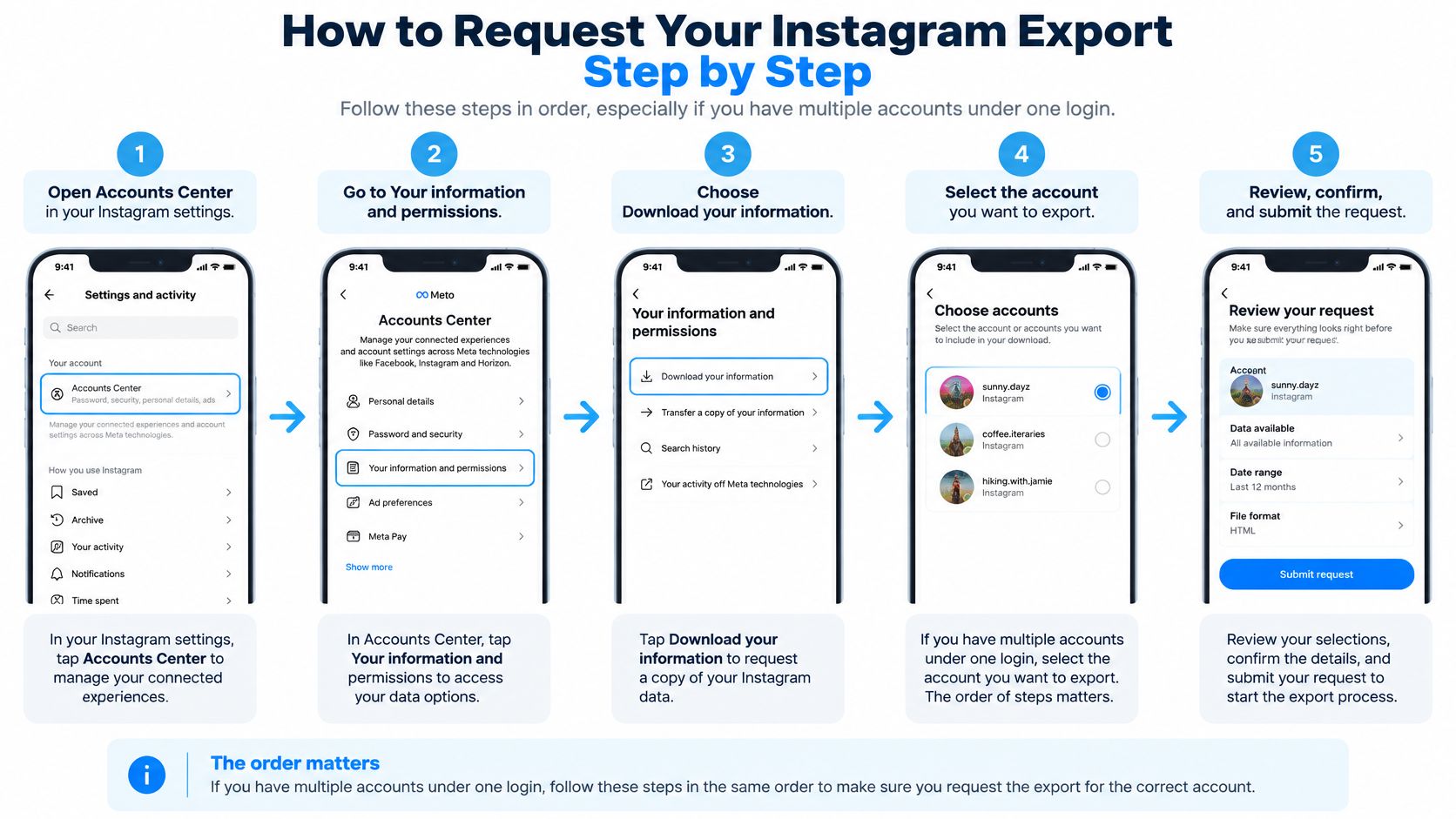
Keep the intended profile name visible while you work. When several accounts share a login, selecting the wrong profile can produce a perfectly valid archive of the wrong account.
The visual below summarizes the route through Accounts Center. Follow the current Export your information label in the interface, even if an illustration uses the older download wording.
Submit the request carefully
- Open Accounts Center from Instagram settings. Go to Your information and permissions. Don't confuse this account-level tool with saving individual posts or taking screenshots.
- Choose Export your information and select the profile. Check the username rather than relying on a familiar profile picture. A linked account isn't necessarily the Instagram account whose records you need.
- Choose the destination. Select Export to device for a downloadable archive, or select an authorized external service for an onward transfer. Confirm the receiving account before sending business information outside your device.
- Select the information categories. Match the selection to your written purpose instead of leaving everything selected automatically. A narrow activity review doesn't need every available account record.
- Set the date range and format. Check both before leaving the screen, especially if you changed one setting but not the other. A readable archive covering the wrong period still won't answer your question.
- Review media quality and the notification email. Confirm that the inbox is accessible to whoever will retrieve the archive. Avoid using a shared address whose membership you haven't checked.
- Start the export and monitor the request. Return to the export area when the completion notice arrives. Don't assume that submitting the request means the file is already ready.
According to Instagram's official data-access documentation, prepared exports remain in Available downloads for 4 days. Download the archive promptly rather than treating the completion email as permanent storage.
Confirm that the request produced the right archive
After downloading, check the account identity, requested categories and date coverage. Compare the apparent file size with what you requested, but don't treat size alone as proof of completeness.
A text-focused export can be small without being defective. A media-heavy request that contains almost nothing deserves closer inspection.
Keep a short request note containing the profile, purpose, chosen categories and submission timestamp. That record helps distinguish an incorrect selection from a damaged download, and it gives a teammate enough context to understand what they're opening.
Reading HTML and JSON Files Without Losing Data
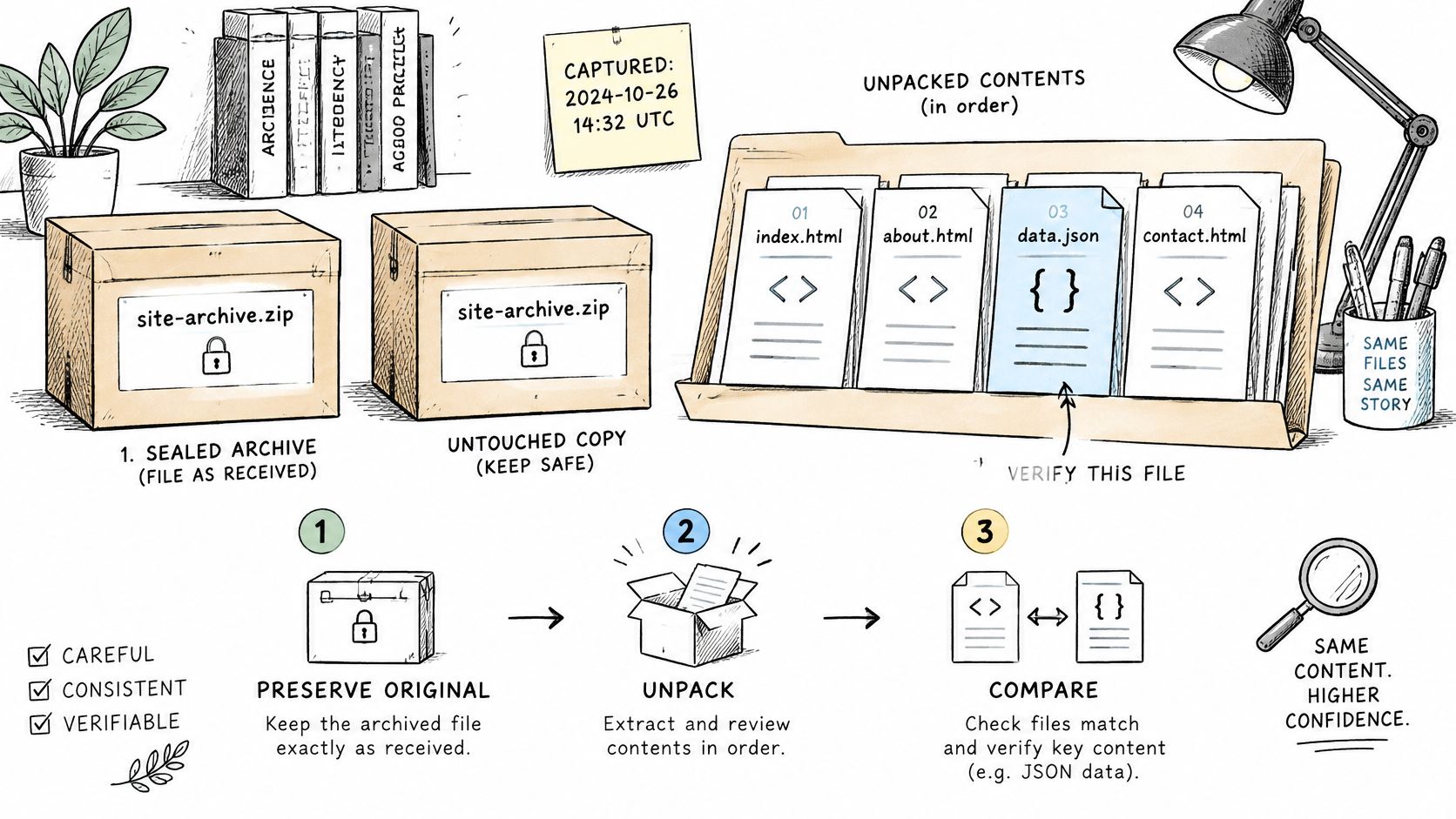
Preserve the original archive before editing anything. Keep it untouched, record the request timestamp, and extract a working copy into a dated folder so a later export can't overwrite it.
Use this handling sequence as a repeatable check.
Inspect the structure before converting
Open the top-level folder and compare its categories with your request. Instagram's export documentation distinguishes available account and activity information from specific information types that include data logs. Look for the requested categories before assuming a missing record is a conversion problem.
Open HTML in a browser. Open JSON in a local text editor such as Visual Studio Code, then use its document-formatting function to inspect the structure. A long, unwrapped line isn't by itself evidence of corruption.
If a selected category is absent, review the request and any export-status information before requesting again. Searching unrelated folders won't recover a category you never selected.
Convert records rather than copying appearances
For spreadsheet work, use a JSON parser and export UTF-8 CSV or XLSX. Define stable columns such as username, name, bio, follower count, category, website, source and collection timestamp, but populate only fields the source contains.
- Preserve text boundaries: A bio containing a comma or a line break must remain inside its field. Use a CSV writer that quotes and escapes values, not a manual join operation.
- Keep unknowns unknown: A blank follower count isn't zero, and an absent contact field doesn't prove no contact exists.
- Deduplicate consistently: Prefer Instagram user ID where available; otherwise use a normalized username while retaining its original display value.
For analysis planning, the Instagram audience analysis guide can help you decide which derived fields are useful without replacing the raw source records.
Use the video alongside your local inspection, rather than uploading the archive merely to preview it.
If a separate analytics handoff gives you an SAV file, PlotStudio AI's guide to free tools for opening SAV files is a relevant format-specific resource. It isn't a substitute for parsing Instagram JSON.
Finish by checking row counts, encoding and duplicate rate against the source records. Inspect names, emoji and multiline bios manually before approving the converted file.
Official Export, Public Collection and API Compared
Instagram data methods compared
| Method | Covers | Returns | Main limit |
|---|---|---|---|
| Official account export | Your own account | Your available archive in HTML or JSON, within the selected scope | Account-owner access; the download expires |
| Public profile collection | Publicly accessible profiles | Usernames, bios, categories and published contact details | Public data only; outreach needs a lawful purpose |
| Instagram Platform API | Professional accounts that granted your app permission | Data tied to the granted permissions | Access tokens, review requirements, Advanced Access where applicable and rate limits |
| Instagram Platform API | Accounts you manage | Permissioned profile and content fields | No arbitrary follower or following lists |
The deciding criterion is whose authority allows access. The official export follows the account owner's request; public collection uses openly exposed information; an API integration operates through permissions granted to an app.
Those methods aren't interchangeable. Your own archive doesn't authorize commercial collection of other people's data, and a public-profile dataset won't replace private account records.
Establish API feasibility before estimating output
The Instagram Platform overview describes a platform primarily serving professional accounts, including businesses and creators. Standard Access is limited, while serving professional accounts your app doesn't own or manage requires Advanced Access, involving App Review and Business Verification.
Authentication and endpoint permissions matter before throughput does. Don't design a workflow around an assumed field, follower list or audience size until the relevant endpoint and authorized account can return it.
For a production integration:
- Save pagination cursors: Checkpoint progress after each successful page so an interrupted run can resume.
- Handle throttling separately: Use exponential backoff for rate limits, but don't endlessly retry authorization failures.
- Keep a run ledger: Record the endpoint, request time, response status, cursor, records received and deduplication results.
- Validate the delivery: Check encoding, unique headers, URL syntax and duplicate records before importing elsewhere.
Measure output per successful page, not elapsed time alone. An empty authorized response and a permission-denied response require different fixes.
Understand the public-collection trade-off
HarvestMyData is an automated Instagram email scraper that extracts publicly listed emails and phone numbers from followers, following lists and hashtags. Users never log in to Instagram through our service, and we don't touch their account; an Instagram account, API keys and proxy servers aren't required.
That route addresses a different task from downloading your history. It produces public-profile information, not private messages, protected content or a substitute account backup.
For broader workflow choices, the social media data extraction guide helps frame collection around the intended deliverable. Test a representative audience before estimating coverage, and verify contacts before outreach rather than assuming every public profile contains usable contact details.
Public visibility tells you what you can see. It doesn't establish permission to contact someone.
Keeping Your Exported Data Safe
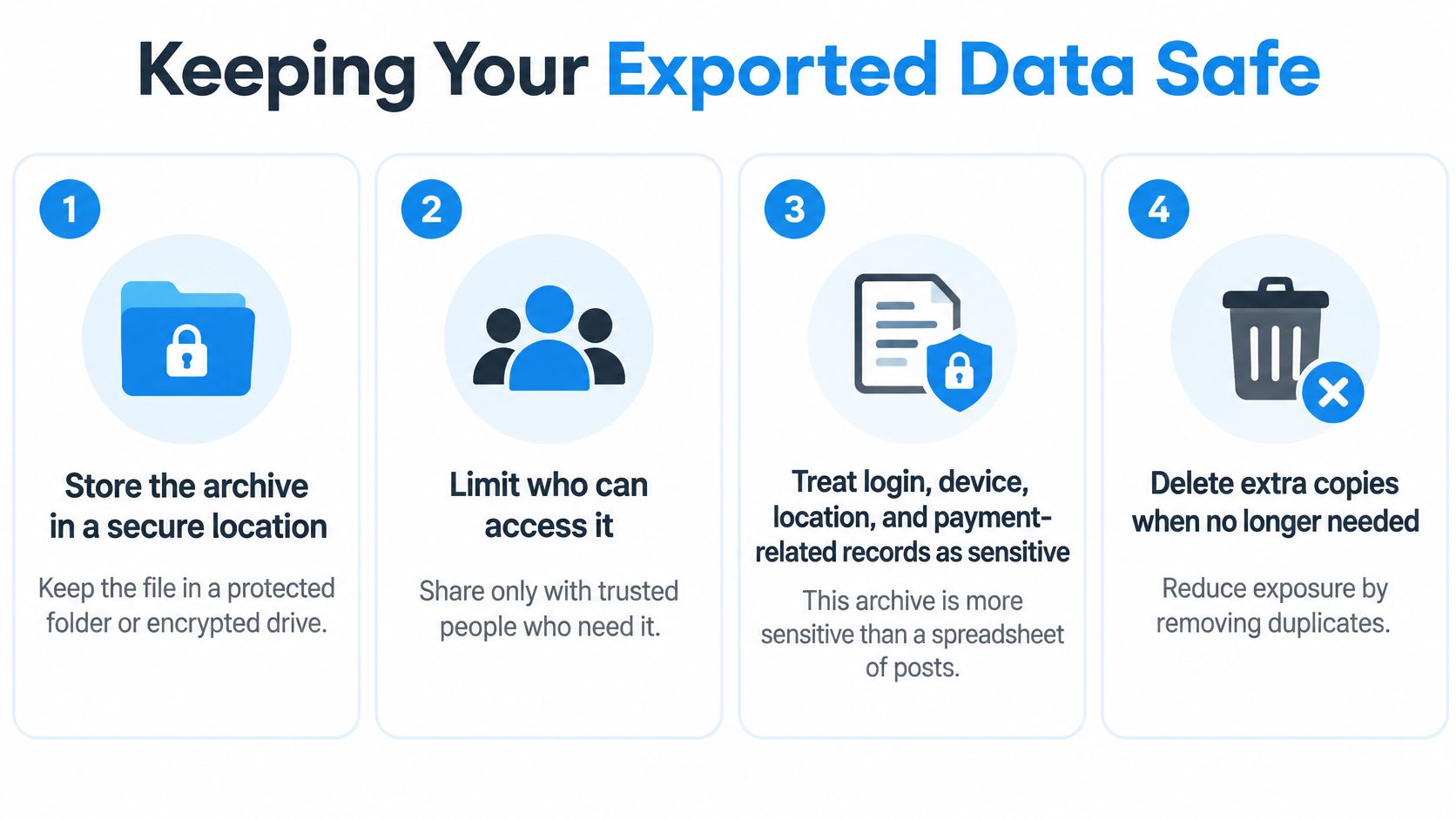
A downloaded archive isn't harmless just because it came from your own account. It can consolidate identity details, login and device records, location information and financial-related metadata outside Instagram's access controls.
An academic audit of platform archives published through ACM examined 273 features and found that approximately one in five features exposed information about people other than the requester. The practical concern isn't only your privacy: exporting your account can also create a file containing information about other people.
Use the checklist below before sharing or converting the archive.
Limit exposure before moving files
- Minimize the next request. Exclude categories you don't need at the selection stage. Deleting them after download still means you created and handled an unnecessary copy.
- Encrypt the raw archive and restrict access. Use protected storage with named users rather than a broadly shared folder. Give analysts the relevant working file instead of the complete archive whenever possible.
- Keep conversion local when practical. Don't upload an account archive to an unfamiliar JSON-to-CSV website. A convenient conversion screen doesn't tell you who retains the uploaded file.
- Redact third-party details from shared copies. Remove unrelated message content, participant details and private contact information. Preserve the restricted original separately if there's a legitimate reason to retain it.
- Set a deletion trigger. Decide when the raw archive and temporary extraction folders should be removed, subject to your recordkeeping obligations. Verification of the normalized deliverable can be a useful trigger when continued retention isn't necessary.
- Separate operational files. Keep any prospecting or CRM import file apart from the raw account archive. Don't carry security metadata or personal conversation history into a sales workflow.
Check the ordinary sharing paths
Email attachments, shared drives and Telegram transfers deserve explicit review. Confirm recipients, folder membership and download permissions before sending anything; then remove unnecessary duplicates from local downloads and temporary folders.
For agencies, label each working folder with the account owner and approved purpose. Avoid filenames that leave teammates guessing whether a file is a public-profile list or a private account archive.
Use data collection ethics as a practical review point for purpose, access and retention.
Handling principle: A fuller archive isn't better data. Export the smallest set that answers the question.
Fixing Missing Downloads and Broken Files
If the download has disappeared, check expiration before trying different browsers or repeatedly opening the notification email. An expired archive needs a new request, not a repair to the old download.
Other symptoms need different treatment. Some are display or import problems you can fix locally; others mean the request itself needs changing.
Export symptoms, causes and fixes
| Symptom | Likely cause | Fix |
|---|---|---|
| No Export your information option | Wrong profile selected in Accounts Center | Switch to the intended profile and check again; local settings check |
| Download link has disappeared | The Available downloads window has passed | Request a new export and retrieve it promptly; requires another preparation cycle |
| JSON file opens as one long line | The viewer isn't formatting valid JSON | Open in a local formatter and validate syntax; local display fix |
| CSV columns are shifted | Commas or line breaks weren't quoted correctly | Rebuild the CSV with a proper writer, then import as UTF-8; local conversion fix |
| Follower or category values are blank | The field was absent or unknown | Retain an unknown value, not zero; no new download automatically needed |
| Archive is too large to open | The request includes unnecessary history, categories or media | Request a narrower scope; requires another preparation cycle |
Separate a display problem from damaged data
A formatter can make JSON readable, but it can't prove that a file is complete merely by adding indentation. Use a parser to check syntax, then inspect the expected records and date coverage.
If extraction software reports an error, keep the original file and try downloading the available archive again before changing its contents. Don't manually delete punctuation from JSON to make an error disappear: you may remove records or alter their meaning.
For CSV problems, reopen the source JSON rather than editing shifted cells one by one. A bio containing a line break can misalign many subsequent rows when the conversion is wrong.
Know when to request again
Switching profiles is a sensible first check for a missing option, not a guaranteed diagnosis. If the control still isn't visible, use Instagram's account help rather than assuming the account can't export information.
Request again when you selected the wrong account, omitted a needed category or chose an unusable scope. Keep the corrected request note beside the previous one so you don't repeat the same selection.
Don't turn blanks into evidence. A missing field says what this dataset lacks, not what must be true about the person or account.
Decide Which Route Fits Your Goal
Choose by ownership, permission and intended use, not by whichever method promises the biggest file.
- Your own history: Use the official export for a backup, records review or migration. Choose a processable format when another system will consume the records.
- Permissioned professional accounts: Use the Instagram Platform API when you need an authorized integration, and establish the access requirements before building it.
- Other public profiles: Use public-profile collection for an audience dataset, then verify contacts and assess the lawful basis for any subsequent outreach.
The European Union's GDPR guidance explains access and portability rights, including machine-readable delivery where portability applies and safeguards for transfers outside the EU. Portability generally concerns automated processing based on consent or contract; it isn't blanket entitlement to inferred or third-party information.
Our collection is limited to publicly available information, not private accounts or protected content. Users must comply with applicable privacy and anti-spam rules, honor opt-outs, avoid harassment or stalking, and not resell or redistribute raw data.
Start with a narrowly scoped account export, verify the files and apply the handling checklist. Then decide whether a separate public-profile dataset is still necessary.
If your task is public-audience contact collection rather than an account backup, visit HarvestMyData to review our public email and phone extraction service and sample output. Define the audience you need before ordering, and keep the resulting CSV or Excel file separate from your private Instagram archive.
We built HarvestMyData to handle all of this for you.
No proxies, no code, no account needed.