How to Target Audience on Instagram: 6 Steps That Work

Most guides on how to target an audience on Instagram tell you to pick an age band, a city, and a few interests, then boost a post. That advice describes people. It does not tell you whether those people have the problem you solve, or whether they will reply.
A large, neatly filtered audience can still be full of fans, students, competitors, and accounts outside your service area. I would not spend a dollar until a sample of public profiles shows that most of them fit the offer. Size is easy to buy. Audience relevance is the variable worth optimizing, and you can prove it with a scored sample before Ads Manager ever opens.
Table of Contents
- The two attributes that mislead most often - Usage is a hypothesis, not a buying rule
- 1. Check the one-line hypothesis - 2. Pick three to five seed accounts - 3. Pull one source from those seeds - 4. Score every profile on a fit rule - 5. Sample 100 to 200 profiles - 6. Keep segments that beat your baseline
- Click through the setup in this order - The 2 by 2 that actually isolates the audience
- What has to be true before you add budget
Audience Attributes and Where to Find Them
Define six attributes before you touch a setting. Each one answers a different question, and each one lives on a different screen.
| Attribute | What it tells you | Where to read it on Instagram |
|---|---|---|
| Age range | Life stage and likely buying power | Professional dashboard, audience insights |
| Gender split | Whether messaging should lean one way | Professional dashboard, audience insights |
| Top locations | Where shipping or service reaches | Professional dashboard, audience insights |
| Language | Caption and creative language | Follower comments and bios |
| Interests and categories | Topics followers already engage with | Ads Manager detailed targeting, hashtags followed |
| Purchase stage | Problem awareness or buying readiness | Comments asking about price, direct messages, saves on product posts |
The two attributes that mislead most often
Age range looks precise and usually isn't. A 28-year-old founder and a 28-year-old student sit in the same bucket, and only one of them can buy a service. Gender split has the same problem. It tells you how to phrase a caption, not whether the person has the job, the budget, or the pain.
Read age, gender, and top cities in the professional dashboard's audience insights. Read interests in Ads Manager's detailed targeting. Read language and purchase stage in comments, bios, and direct messages. A comment that asks the price is a stronger signal than a like.
Usage is a hypothesis, not a buying rule
Platform use is uneven, so a single "Instagram audience" is a fiction. Pew Research Center's 2024 survey of U.S. adults found that 58% of Hispanic adults and 57% of Asian adults reported using Instagram, compared with 46% of Black adults and 43% of White adults. The same survey found women more likely than men to use it, and usage higher among adults with some college or a degree than among those with a high-school education or less.
Those figures describe who opens the app, not who intends to buy. Treat them as hypotheses. Test gender, education, and related interests as separate groups, then judge them on reach, engagement, click-through, qualified leads, and conversion. If you sell education, software, or professional services, education-related splits are a sensible first test. Consumer brands can use the same splits for language, creative, and landing-page copy.
Instagram already filters ads on a short list of controls: demographic (age, gender, location), interest and behavior, connections to your Page or account, custom audiences from your customer list or site visitors, and lookalikes built from those lists. Automatic delivery also uses signals you didn't pick, so the controls are a starting filter, not a portrait of who sees the ad. A practical walkthrough of those native screens sits in this Instagram audience analysis guide. For a small-business framing of the same idea, Instagram audience targeting for small businesses is a useful companion.
Pick three attributes that match your offer. Write each as one line: who they are, which problem they have, and where they spend attention.
Choose the Right Audience Source
That one-line hypothesis decides which source you test first. Sources are not equal. A public comment shows more interest than a like. A competitor's follower shows taste in the category, not the ability to pay.
| Source | Signal strength | Best use | Main limit |
|---|---|---|---|
| Followers of a competitor | Medium: they chose a similar brand | Prospecting in the same category | Many are existing customers or casual fans |
| Following list of a buyer persona account | Medium to strong: they follow peers and experts | Finding niche professionals | Can include unrelated accounts the persona follows out of habit |
| Hashtag posters | Medium: recent activity on a topic | Finding active voices in a niche | Broad tags pull in unrelated posters |
| Commenters on a post | Strong: they replied publicly | Finding engaged, high-intent prospects | Small pool that may include competitors |
| Likers on a post | Weak to medium: a low-effort action | Estimating reach around a topic | Many passive users |
| Lookalike audience in Ads Manager | Only as strong as the seed list | Scaling paid campaigns | Only as good as the customer list it is built from |
Two sources people misread
Competitor followers feel like a ready market. Plenty of them already bought from that brand, or they followed for entertainment and never open DMs. Use this source for category prospecting, then score for role and problem, not for the follow itself.
Likers are the other trap. A like is a thumb tap. It estimates how far a post traveled. It does not tell you the person has a budget. Commenters are the opposite: the pool is small, competitors show up, and the people who asked a real question are the ones worth keeping.
Broad hashtags fail the same way. Check the first ten posts by hand. If half of them are memes, giveaways, or a different industry, don't collect that tag. Use a specific tag that names the problem or the job.
Scale is not the reason to stay broad. DataReportal's Digital 2025 Global Overview, using Meta's advertising tools, reported potential reach of approximately 1.67 billion Instagram users aged 18 and above. That figure is advertising reach, not buyers and not guaranteed impressions. It does mean a narrow slice, such as one competitor's followers or one niche tag, can still be large enough to test. The same report said Instagram's reported ad reach grew by more than 5% in the preceding year, ahead of TikTok's 2% net adult-ad-audience growth. Growth makes qualification more important, not less.
We collect one public source at a time. You choose followers, following, hashtag, comments, likers, or location, then enter a public username or profile link and export the list. One source per export is the rule, because a mixed file hides which source produced profiles that match the hypothesis.
Practical rule: Run one source until you know its fit rate. Adding a second source before that only blurs the result.
When you later exclude customers from paid reach, read how exclusion rules override inclusions. This note on how to understand Meta audience exclusion limits saves a quiet test failure.
Build and Score a Target Audience in Six Steps
The six steps below turn the hypothesis into a scored list. Relevance, not follower count and not a narrow age setting, is what you optimize.
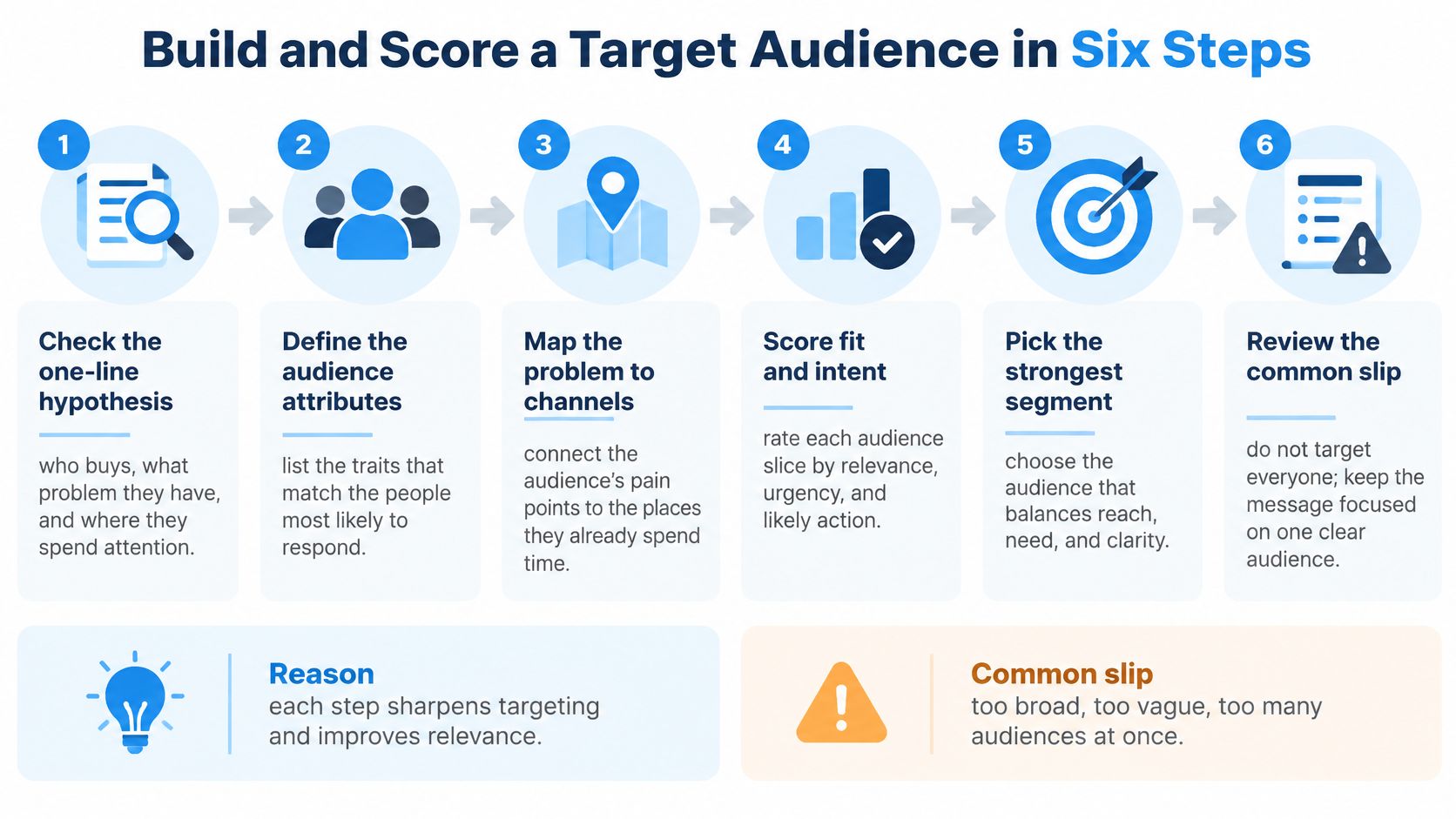
Most write-ups stop at the controls Instagram offers. Instagram's own ads guidance lists demographic, interest, connection, custom, and lookalike options, and notes that automatic targeting also uses location, demographics, and interests. That is a menu of settings, not a check that the people are commercially relevant. Platform-selected reach is hard to read without your own quality sample.
1. Check the one-line hypothesis
Write who buys, what problem they have, and where they spend attention. "Women 25 to 45" fails this step. It names people and skips the need. If you can't say the problem in one clause, you don't have a segment yet.
2. Pick three to five seed accounts
Choose competitors, creators your buyers already follow, and industry publications. Their audiences already gather around the topic, so you aren't guessing from a cold interest keyword. Skip celebrity accounts. Their followers are spectators.
3. Pull one source from those seeds
Take followers, a following list, hashtag posters, or commenters and likers on a high-intent post. One source per pull. A following list of a peer account often beats a mega brand's follower list, because people follow peers and experts on purpose.
4. Score every profile on a fit rule
Give each signal 0, 1, or 2:
- Account type: business or creator, not a personal fan page.
- Role: the job in the bio matches your buyer.
- Location: you can ship or serve there. Geography is its own filter, and this geographic targeting walkthrough shows how to apply it without pretending a city name is intent.
- Website: a real link, not an empty bio.
- Problem language: the bio or a recent post names the problem.
- Comment quality: a question, not only an emoji.
- Recency: a post or comment in the last 30 days.
The common slip is scoring by follower count. A 200,000-follower meme page can score zero on every line above.
5. Sample 100 to 200 profiles
Average the scores and record how many pass your cutoff. Instagram Insights describes people who already follow you. This manual sample describes prospects. Reconcile the two. If Insights says your followers are mostly in one city, and the prospect sample is mostly somewhere else, don't scale the city your current fans happen to live in.
A short walkthrough of sampling public profiles before you spend is worth watching once, then doing on your own seeds.
6. Keep segments that beat your baseline
Drop the rest, even when the file is large. A big segment that passes at a low rate costs more per useful reply than a small one that passes cleanly.
Say the tight segment produces a qualified reply from 1 in 100 people you contact, and the broad segment produces 1 in 500. On 1,000 contacts that is 10 replies against 2. Divide your time or ad spend by qualified replies, not by impressions, and the smaller list wins. Founders, agencies, and SDR teams feel this first, because a file full of consumers, inactive accounts, students, competitors, or people outside the service area cannot be called a market.
A usable audience has three properties. Most sampled profiles match the hypothesis. Duplicates are gone. Every row carries its source, so you can stop the source that fails.
A 1% reply rate on a tight segment beats a 0.2% rate on a broad one as soon as you divide spend by qualified replies.
Test Segments With Paid Campaigns
Only segments that passed the sample deserve a budget. Five ad sets keep the question narrow: which audience produces a qualified result, not which one gets likes.
| Ad set | Audience | Job in the test | Judge by |
|---|---|---|---|
| Engagement retargeting | Profile visitors, saves and video viewers from Instagram | Warm follow-up on interest already shown | Cost per qualified lead |
| Customer exclusion | Existing customers and converters | Stop paying to reach people who already bought | Overlap with other ad sets |
| Niche interest | Interest cluster built from the best-scoring segment | Test whether the niche converts | Cost per qualified lead |
| Broad prospecting | Broad audience with minimal restrictions | Benchmark against the niche | Cost per qualified lead |
| Lookalike | Built from the best customer seed list | Expand from proven buyers | Cost per qualified lead and downstream revenue |
Click through the setup in this order
Meta's Custom Audiences documentation is the reference for the mechanics. The sequence that keeps a test clean is short.
- Install the Meta Pixel and Conversions API, then fire a test lead, purchase, or registration and confirm the event arrives. An unvalidated event makes every later comparison meaningless.
- In Ads Manager, build an Instagram-engagement Custom Audience. Segment high-intent actions: profile visits, saves, video viewers, lead-form completion.
- Set a recency window. Meta allows up to 365 days. Shorter windows usually match people who still remember you.
- Exclude existing customers and converters from every prospecting ad set. Meta notes that exclusion rules override inclusion rules, and that richer customer identifiers improve matching. Incomplete records and contradictory logic shrink reach or mix the test.
- Build separate prospecting ad sets on a lookalike or a broad audience. Keep the engagement segment for retargeting only. Meta states that custom audiences can use customer identifiers or engagement data, and that lookalikes find people similar to customers or engagers.
The 2 by 2 that actually isolates the audience
Cross two audience sources with two creative angles: high-intent engagement against a customer-value list, and problem-led creative against proof-led creative. Hold budget, placement, optimization event, attribution window, and landing page identical. If Stories are one of those placements, it helps to explore Instagram Story advertising so the format doesn't become a hidden variable.
Judge cost per qualified lead or purchase, not likes. A randomized holdout, where you can run one, tells you whether the ads caused the result.
Three pitfalls wreck this design. Mixing prospecting and retargeting in one audience makes a warm click look like cold performance. A lookalike built on low-quality seeds copies the wrong people. Changing the optimization event before enough conversions accumulate resets learning and invalidates the comparison.
Confirm the Audience Before You Scale
Cheap clicks are not a reason to raise the budget. Pause any segment that keeps producing inexpensive clicks and weak qualified conversion. Popularity is not intent.
Watch each segment on its own row: CPM, reach, frequency, click-through rate, qualified-lead rate, cost per qualified lead, and downstream revenue. Meta's advanced targeting guidance says to read quality, engagement, and conversion-rate rankings against auction competitors, not against a universal benchmark. Your baseline, and the other ad sets in this test, are the comparison that matters.
What has to be true before you add budget
Public signals are research hypotheses. Followers of creators, hashtag participants, commenters, and likers are not verified intent, so they should not go straight into an ad account or an outreach sequence. HarvestMyData can pull followers, following, or hashtag audiences from any public account so you can score them first. Scoring comes before any upload or any outreach.
A lookalike seed should be your best customers, ranked by lifetime value, transaction value, order size, or engagement. A random export makes a poor seed. Deduplicate, normalize country and language, drop obvious bots and off-topic categories, and score each row by source, recency, niche fit, and business relevance. A fit rate read across a 100-profile sample tells you whether the source deserves a bigger pull. For reading those rows after a test, an Instagram analytics tools checklist keeps the metrics in one place.
Don't contact anyone without a lawful basis and a clear opt-out. A researched profile is not consent.
Scale only when all five are true:
- Cost: the segment beats your baseline on cost per qualified lead.
- Fit: the sample fit rate still holds once volume rises.
- Clean file: duplicates are removed.
- Traceable source: every row records where it came from.
- Lawful contact: every person you message has a lawful basis or first-party consent.
If any one fails, go back to the fit score before adding budget or starting outreach. Overlapping audiences that inflate frequency, and broad tags that contaminate the file, are the two failures that look like success in the ads dashboard and fail in the pipeline.
HarvestMyData turns a defined Instagram audience, such as followers, a following list, a hashtag, commenters, or likers, into a structured file you can score before you spend. You pick a public account or tag, and the returned file carries publicly listed profile fields, so the 100-profile fit check is a spreadsheet job instead of a weekend of clicking. No Instagram login is required on your side. Visit HarvestMyData to run that sample on the source you chose first.
We built HarvestMyData to handle all of this for you.
No proxies, no code, no account needed.