What Is Web Scraping? a Plain-English Guide for 2026

Web scraping is the automated retrieval of publicly accessible web pages, followed by extracting chosen fields into a structured dataset such as a spreadsheet or database. You're likely staring at competitor pages, directory listings, or public profiles and copying the same few fields by hand. That loop is the job scraping was built to replace. Public visibility is only the starting point, though. A page anyone can open doesn't settle terms of service, privacy rules, or the signals a site owner publishes for automated visitors.
Table of Contents
- What Web Scraping Means in Plain Terms
- How a Scraper Reads a Web Page, Step by Step
- Six Ways to Scrape a Website and Which to Pick
- A rule you can follow in order
- Research, rankings, and property
- Why "public" doesn't mean reusable - Checks before the first request
What Web Scraping Means in Plain Terms
Say you run a small shop and every Monday morning you open about 400 competitor product pages. You copy the name, the price, and whether the item is in stock, then paste each line into a spreadsheet before the week starts. By the third hour your eyes skip rows, and one missed price change can cost a sale.
Web scraping does that copy work for you. It is the automated retrieval of information from publicly accessible web pages: a program sends requests, receives HTML or rendered page content, and extracts the fields you chose into a structured dataset. A researcher working through a shelf of printed catalogues might copy only the price column onto index cards. A scraper does the same job in seconds, and it keeps going for as many pages as you point it at.
Three moves make up the idea.
- Fetch the page. The program asks the site for a specific address, the way your browser does when you click a link.
- Extract the fields. It pulls only what you named, such as a price, a title, or a public website.
- Structure the result. Each item becomes one clean row in a spreadsheet or database.
Crawling and scraping get mixed up, and the mix-up matters. Crawling discovers and revisits pages by following links. Scraping pulls specific information out of pages it already holds. One system often does both: it finds the pages, then lifts the fields.
The habit is older than online shops. In 1993, Matthew Gray, an MIT undergraduate, built the World Wide Web Wanderer, the first known web crawler, to measure how quickly the web was growing. Its work was counting and mapping, the same discovery job search engines still depend on today. Automated collection began as measurement, and the same idea now sits behind price trackers, monitoring tools, and research datasets.
Notice that this definition covers capability alone. A page anyone can open is a technical fact, and it says nothing about terms of service, privacy obligations, or the signals an owner publishes for automated visitors. Requesting one page and requesting ten thousand use the same mechanism, so scale itself is part of the question. Keeping "can a program read this" separate from "may it" is the clearest way to understand what scraping is.
If you can say "fetch, extract, structure," you already know the technique.
How a Scraper Reads a Web Page, Step by Step
Picture a diner who orders a dish. The scraper is the waiter: it asks the kitchen for the page, then reads the recipe card that comes back and copies only the lines you care about. The kitchen here is the website. The recipe card is the page's underlying text, not the polished layout you see on screen.
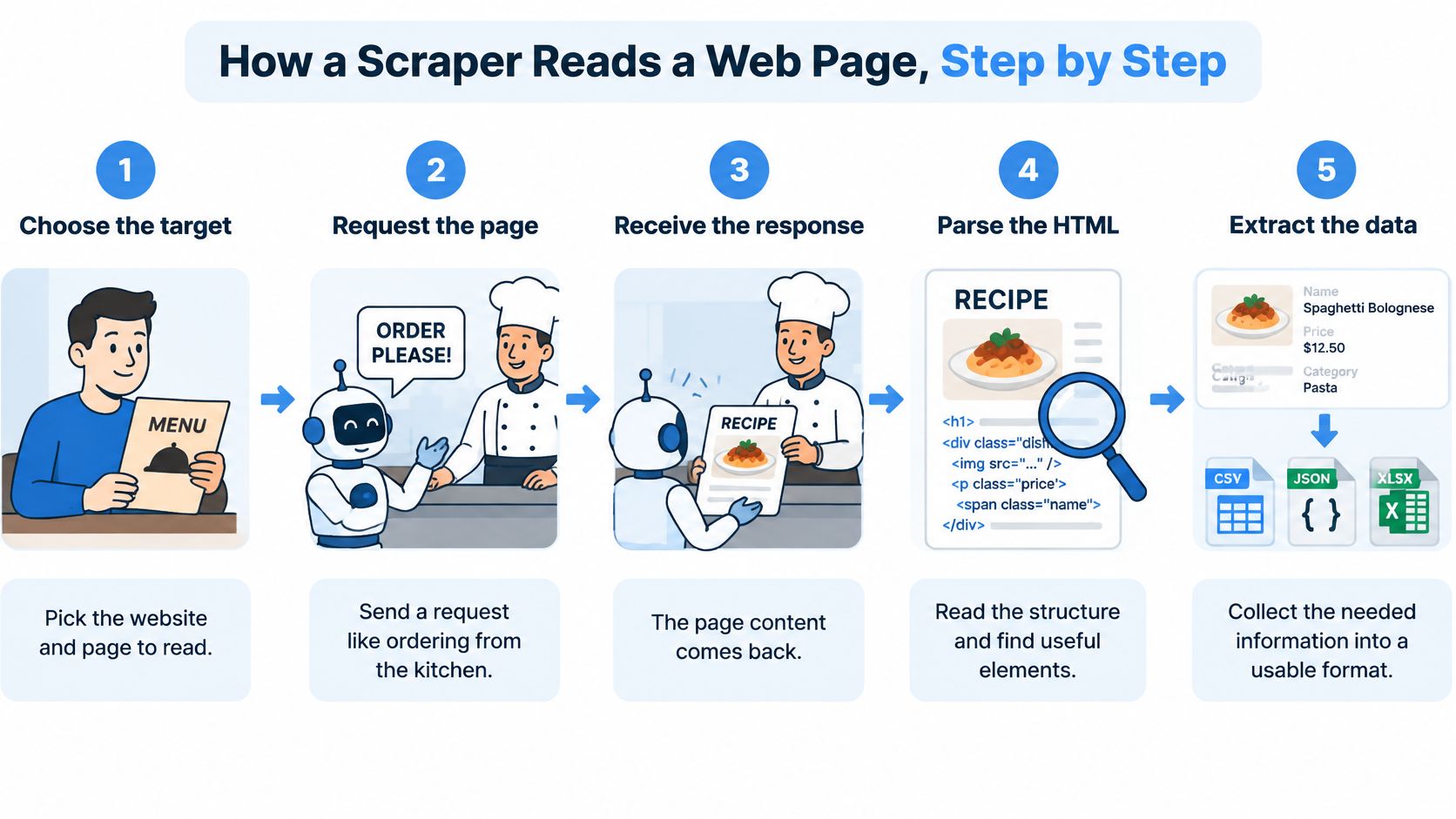
The picture above compresses the path into five labels. In practice the work has a few more checkpoints, and each one exists because the last one can fail.
- Choose the target. Start from a list of addresses, or follow links on a category page. A bad list wastes every later step, so write down exactly which pages hold the fields you want.
- Send an HTTP request. This is the same kind of request your browser sends when you open the page. The program is asking, not clicking around a screen.
- Receive the response. You usually get HTML, the page's text structure of tags and attributes. That text is what the program can search.
- Parse the HTML into a tree. Parsing turns the flat text into nested elements so each one can be addressed. Without a tree, you're hunting through a wall of markup.
- Select the fields. CSS selectors or XPath point at an element, for example the tag whose class is
price. You're naming a location, not guessing at nearby words. - Clean the values. Strip currency symbols, turn text into numbers, and drop duplicates. A price stored as "£12.00" won't sort until it becomes 12.
- Save one row per item. Write CSV, Excel, JSON, or a database row, and keep the source address plus the collection date. Provenance is what lets you recheck a weird number later.
- Repeat on a schedule, and expect breakage. Timeouts, missing pages, and redesigned layouts will show up. A job that ran on Monday can return empty cells on Friday because a designer moved the price into a new tag.
Practical rule: If the price you see in the browser isn't in "View Page Source," the page is filling that box with JavaScript after the first response arrives.
That's why scrapers break when a site changes its layout. The selector still looks for yesterday's class name, and yesterday's class name is gone. Pages whose content loads through JavaScript need a rendering browser that runs the page the way Chrome does. The next section is where you pick that tool, and only when a plain request isn't enough.
Try this on any product page you already have open. View the source, then search for the price digits. If you find them in the HTML, a simple scraper can read that page.
Six Ways to Scrape a Website and Which to Pick
You don't need the heaviest tool for every page. Match the method to the page type, your skill, and how many rows you need. The comparison below is the short version. The rule after it is the order to try them in.
| Method | Skill needed | Handles JavaScript pages | Typical scale | Best for |
|---|---|---|---|---|
| Manual copy and paste | None | Yes, you see the rendered page | Dozens of items | One-off checks |
| Spreadsheet import functions (IMPORTHTML, IMPORTXML) | Basic formulas | No | Hundreds of simple rows | Tables on static pages |
| No-code tools and browser extensions | Low, point and click | Often yes | Thousands of pages | Business users with recurring jobs |
| Python with requests and BeautifulSoup | Intermediate coding | No | Thousands to millions of pages | Static sites with custom logic |
| Headless browsers (Playwright, Selenium) | Intermediate to advanced coding | Yes | Thousands, slower per page | Logins, clicks, infinite scroll |
| Official APIs or data feeds | Low to moderate | Not applicable | Set by provider quotas | Stable, permitted access; first choice when available |
Manual copy and paste still wins for a handful of items. You already see the rendered page, so JavaScript isn't a problem, and writing a script for twelve rows is slower than highlighting them.
Spreadsheet import functions such as IMPORTHTML and IMPORTXML pull a simple static table straight into Google Sheets or Excel. They don't run JavaScript, so a blank import usually means the table isn't in the first HTML response.
No-code tools and browser extensions suit business users who repeat the same job. You point, click the fields, and schedule the run. Many of them render the page, which is why they often survive JavaScript that a formula can't.
Python with requests and BeautifulSoup is the custom route for static sites. You write the logic once, then scale from thousands of pages into the millions, as long as the data is already in the HTML.
Headless browsers such as Playwright and Selenium drive a real browser without a window you watch. Use them for logins, clicks, and infinite scroll. They're slower per page, so don't reach for them when a plain request already returns the fields.
Official APIs or data feeds should be the first stop whenever they cover what you need. Quotas are set by the provider, and the format usually stays put when the website's design changes. If you're weighing a feed against building your own collector, the difference is laid out in this web scraping versus API comparison.
A rule you can follow in order
Check for an API or export first. If the page is a small static table, use a spreadsheet import. Move to a no-code tool when the job repeats. Write code when the logic is custom, such as skipping out-of-stock rows or joining two fields. Use a headless browser only when the page demands clicks, scrolling, or a signed-in view.
Any scraper can break within weeks of a redesign, so a recurring job needs someone watching the output, not just a timer that fires.
A 300-row product table on a plain HTML page is a spreadsheet job. A 50,000-page catalogue, with filters and a layout that shifts every season, needs code, a schedule, and a person who notices when the row count suddenly drops.
Common Use Cases and the Data Each One Collects
A retailer tracking rivals doesn't need every word on a product page. It needs the name, the price, and whether the item is in stock, refreshed often enough to change its own price before the weekend. That single question, "what changed since yesterday?", is what makes price monitoring the clearest use of web scraping. Hundreds of product pages, checked daily, feed one decision: hold the price, match it, or stop advertising an item that's gone.
The same pattern shows up in other jobs. The table maps the goal to the fields and the kind of page they usually live on.
| Use case | Typical data collected | Common source type |
|---|---|---|
| Price monitoring | Product name, price, stock status | Retail product pages |
| Lead generation | Business name, category, public website or contact | Business directories and public business profiles |
| Job aggregation | Job title, employer, location, salary range | Job boards and career pages |
| Market and academic research | Review text, ratings, listings, post text | Public review sites, forums, news sites |
| SEO rank tracking | Search positions, snippets, competitor URLs | Search results pages |
| Real estate listings | Address, price, size, agent name | Property listing portals |
Lead generation answers "who is publicly listed in this category, and how do I reach the business?" You might pull a few hundred directory rows, or tens of thousands if the territory is national. The output is a list for a sales workflow, not a dump of every bio line. Scale changes the math. Scraping takes about 2 minutes per 1,000 accounts, so a 10,000-row audience is an afternoon problem for a person and a short cloud job for a program. For fields that sit in licensed registries rather than social profiles, it helps to browse professional population data sources before you decide a scraper is even the right tool.
Job aggregation answers "which roles opened this week, where, and at what posted range?" A local board might be hundreds of pages. A national aggregator can run into the tens of thousands. Freshness is daily or better, because a filled role is useless by Thursday.
Research, rankings, and property
Market and academic research collects review text, ratings, listings, or forum posts to answer "what are people saying?" Weekly snapshots are often enough. The decision is a product change or a paper, so you keep the text, not just a star count.
SEO rank tracking records positions, snippets, and competitor addresses so you can see whether a page moved. Search results pages are the source, and a weekly or daily check is what makes a drop visible before traffic falls off.
Real estate listings gather address, price, size, and agent name from property portals. Buyers and agents care about this week's price, so stale rows mislead a valuation.
Across all six, the technique is the same and the purpose is not. Purpose decides which fields are worth storing and how carefully you have to handle them once a name or a contact sits in the file.
Barriers, Robots Files and Responsible Request Limits
A new scraper usually gets through a few hundred pages before anything pushes back. Then the responses change: requests return errors, an address stops working, a puzzle appears asking you to pick out traffic lights. None of that is a legal notice. It is the site telling you, in technical terms, to slow down or stop. A well-behaved scraper takes the hint before an engineer forces the issue.
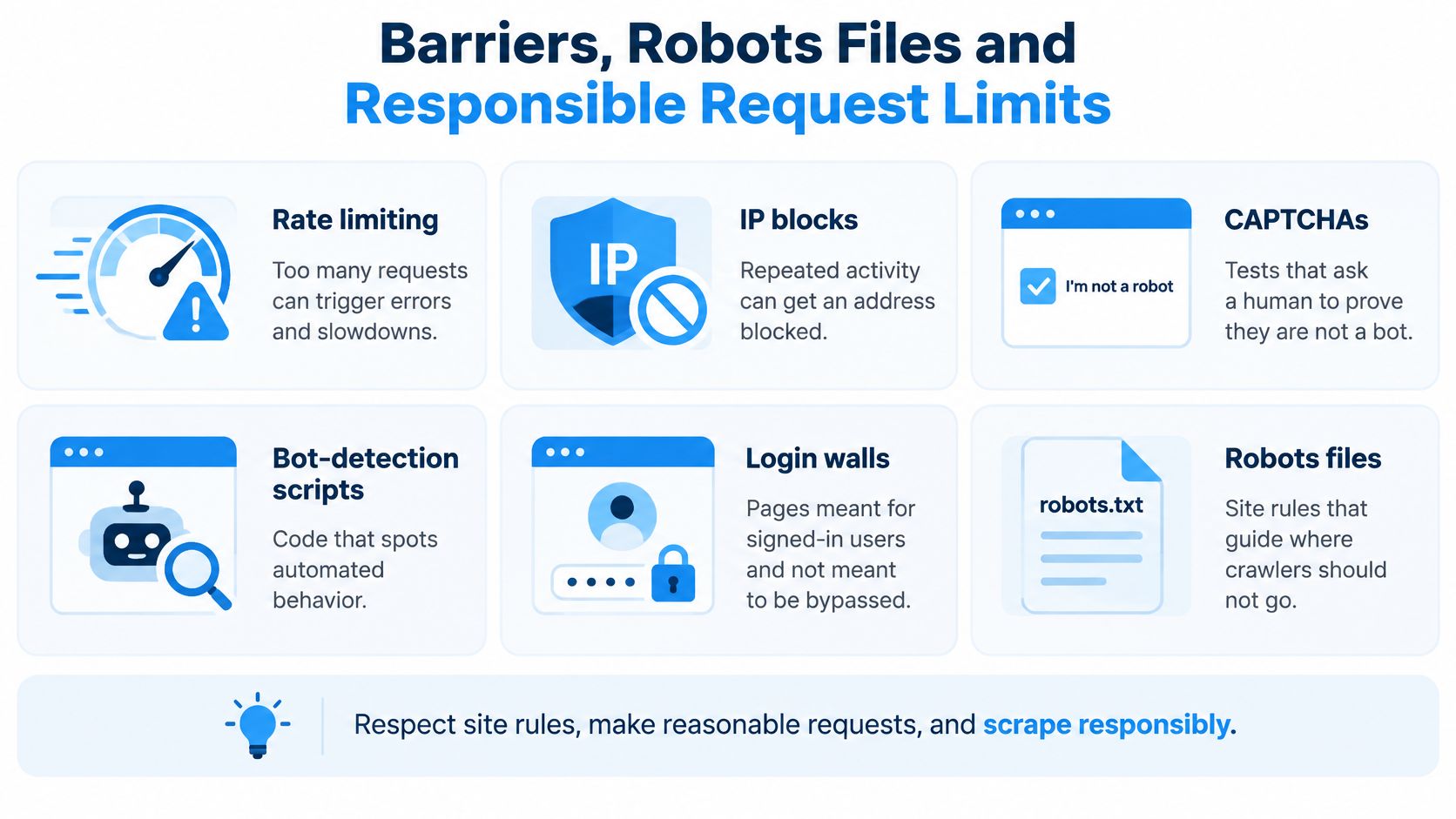
Each barrier has a habit that answers it:
- Rate limiting. Too many requests in a short window return errors or a slowdown. Space requests a few seconds apart, and pause when errors begin. Ignoring this works like emptying a shop shelf into a trolley while other customers wait.
- IP blocks. Repeated bursts can get an address cut off. Caching pages, so the same page is never fetched twice, keeps total volume down.
- CAPTCHAs. These tests ask a human to prove they are not a bot. Treat one as a stop sign, not a puzzle to beat.
- Bot-detection scripts. Code on the page watches for automated patterns, like identical timing between clicks. A clear user-agent string, with contact details, tells the owner who is calling.
- Login walls. Pages behind a sign-in are for account holders, and the wall marks the boundary of public access.
- Robots files. A
robots.txtfile at the root of a domain lists paths the owner asks crawlers to avoid. Read it before you start.
That last one confuses people, because robots.txt carries no enforcement of its own. It is a posted request that well-behaved crawlers honour voluntarily. A 2025 study of crawler behaviour found that bots were less likely to comply with stricter robots.txt directives, and that some AI search crawlers rarely checked the file at all. With AI and search crawler traffic growing quickly in recent years, site owners rely on rate limits, authentication, and bot verification for the enforcement a polite request cannot provide.
Reaching a page answers the access question only. Terms of service, server load, privacy, and copyright are separate questions, and an open door on the first settles none of the rest. If you buy a dataset instead of collecting it yourself, ask how it was gathered, whether those controls were respected, how freshness and provenance are documented, and what removal process exists. The practical side of those checks is covered in this guide to data collection ethics.
Legal Limits and Checks Before You Scrape
A public park can have an open gate and still post a sign that bans commercial filming. The path is open. The use is not automatically open. Treating "anyone can see it" as permission is the assumption that gets founders, agencies, and sales teams into trouble.
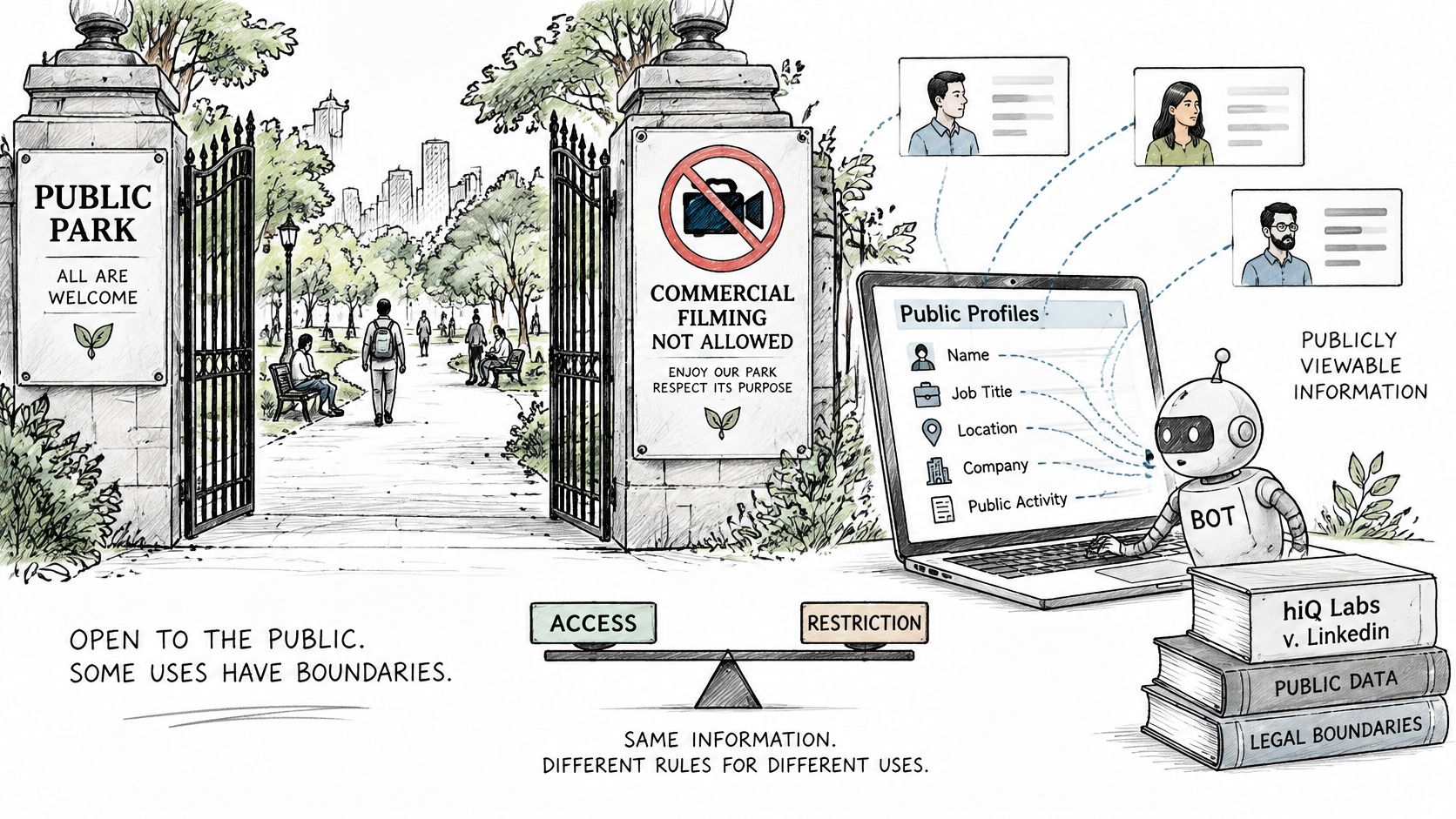
The U.S. case hiQ Labs v. LinkedIn shows how separate those questions are. The case summary from Global Freedom of Expression records that hiQ, founded in 2012, used automated bots to collect information from publicly viewable LinkedIn profiles for business analytics. LinkedIn sent a cease-and-desist letter in June 2017. In 2019, the Ninth Circuit held that the Computer Fraud and Abuse Act's restriction on access "without authorization" did not generally cover automated collection of data displayed on public webpages. The Supreme Court remanded the matter in June 2021. The Ninth Circuit reaffirmed the public-data point in April 2022. The dispute ended with a private settlement and a permanent injunction in December 2022.
Scraping publicly visible information may not, by itself, be unauthorized access under that particular U.S. statute. Terms of service, contract claims, privacy duties, login walls, technical circumvention, and the law of the place you operate can still matter. Public access, platform rules, privacy, and purpose are four different questions. Answering one doesn't answer the others.
Why "public" doesn't mean reusable
Academic discussion of social-media collection, including a review of scraping as human-subject research, treats profile data as information about identifiable people and stresses compliance with each platform's terms. The practical question is when a business may collect, store, enrich, and contact people. "No login required" doesn't resolve consent, a lawful basis, direct-marketing rules, cross-border transfer, or the platform contract. Automation can make data fresher and, at the same time, raise compliance risk just because the file is larger.
A service can limit itself to what a profile already shows. We provide publicly available contact information extraction from social media profiles and other public sources, and we don't access private accounts or protected content. That limit is technical. It doesn't pick your lawful basis for you. Our users agree to use data only for lawful purposes, comply with anti-spam laws such as CAN-SPAM and GDPR, not use data for harassment or stalking, not resell or redistribute raw data, and honor opt-out requests. If the next step is a message, read LinkedIn outreach disclaimers before you treat a public profile as an invitation to write. A fuller walk-through of the legal fork is in this explainer on whether web scraping is legal.
Checks before the first request
- Look for an official API, export, or feed that already has the fields. That's the stable, permitted route, and it survives redesigns better than a selector.
- Read the terms of service and `robots.txt`. A disallow or a contract ban is a reason to stop, even when the page loads in a browser.
- Decide whether personal data is involved. Names, emails, and phone numbers can trigger privacy law, including GDPR, depending on where you and the person are.
- If it is, narrow the file. Collect only the fields the project needs, record the source and the collection date, set a retention limit, avoid sensitive attributes, and honor deletion and objection requests.
- Check any outreach against anti-spam rules such as CAN-SPAM and GDPR. Don't use the data to harass anyone, and don't resell the raw records.
- Pick the method that matches your skill and scale from the comparison above, starting with the official feed when one exists.
- Test on around 100 pages, check the output by hand, then schedule with monitoring. A silent failure is worse than a slow start.
Rules differ by jurisdiction, and GDPR-conscious practice stays your responsibility even when a provider runs the collection. Commercial projects at any real scale should get legal advice before the first send, not after a complaint.
The short video below walks through the same idea in motion: a page is public, a collector is automated, and the limits still sit with the person who keeps the file.
HarvestMyData extracts publicly listed contact details from public social profiles and other public sources, then delivers them as a spreadsheet you can work from directly. If you're sorting out what web scraping should and shouldn't collect before you build a list, start with a source that stays on public data and leaves private accounts alone. Visit HarvestMyData to see how a job runs and what the output looks like.
We built HarvestMyData to handle all of this for you.
No proxies, no code, no account needed.