Instagram Comments Scraper: How It Works in 2026

Pew Research Center found that 47% of U.S. adults used Instagram in a survey fielded from May 19 to September 5, 2023, and that roughly six in ten U.S. teenagers use the platform, with the share saying they use it "almost constantly" climbing from 8% in 2023 to 12% in 2024 (Pew Research Center). Those figures get quoted to justify buying a comment export. They measure platform reach, and reach is the least useful thing a comment file tells you.
A comment file isn't a contact list. It's a stack of timestamped statements, each attached to one post, one author and one moment. Read that way, comments show which offers people ask questions about, which creators have audiences that buy, and which threads are worthless noise dressed up as engagement.
The discipline that follows is simple to state and hard to keep. Treat every row as a provenance-tagged signal about a post, and only treat it as a candidate for outreach once it has survived deduplication, relevance filtering and a legal check.
Table of Contents
- What a single row actually tells you
- Four post types and what each one hands you
- How to Turn Comments Into a Prospect List
- Separating Buying Intent From Noise in Comments
- Measuring Coverage and Survival Rate
- Coverage is what you retrieved against what the post shows - Survival rate is what remains after each filter
What an Instagram Comments Scraper Collects
An Instagram comments scraper outputs one row per comment, not one row per person. A post with 214 comments produces 214 rows, several of them from the same handful of accounts, and each row is a signal about that post rather than a profile you now own. That single fact governs everything downstream, from how you count prospects to what you can claim about the list you hand to a sales team.
| Field | Where It Comes From | How Prospectors Use It |
|---|---|---|
| Commenter username | Comment author | Identifies the account and deduplicates candidates |
| Comment text | Comment body | Reveals purchase questions, complaints and requests |
| Timestamp | Comment creation time | Separates recent intent from stale activity |
| Like count | Likes on the comment | Gives a rough engagement weight for ranking |
| Post URL | Parent post or media | Records provenance for every row |
| Reply status | Replies field, if requested | Shows whether the thread continued past the first comment |
| Full name, bio, category | Commenter's public profile | Confirms the business or creator type and the niche |
| Follower count | Commenter's public profile | Helps filter for account size and relevance |
| Published email or phone | Business or creator profile contact fields | Enables outreach only where the account published contact details |
What a single row actually tells you
The commenter username is the only stable join key in the file. Two rows with the same handle are the same person, whether they commented once or forty times, and the handle is what you deduplicate on before any total gets quoted to anyone. Comment text carries the intent: questions about price, shipping and sizing sit in the same field as complaints, jokes and emoji replies, which is why text alone never works as a qualification rule.
Timestamp separates a comment left during launch week from one left on a post that's two years stale. Like count gives a rough weight for ranking a thread and nothing more. Neither field tells you whether the person bought anything.
Post URL is the field that makes the rest auditable, because it ties every row back to the thread it came from, so a later question about where a name originated has an answer. Full name, bio, category and follower count require a second lookup on the commenter's public profile, a different operation with a different risk profile from reading a comment. Published email or phone exists only where a business or creator chose to publish contact details, and its absence is the norm rather than an error.
The distinction that matters: a comment is evidence of interest in one post. It isn't an opt-in lead, and it isn't a verified contact.
How Comment Collection Works Behind the Scenes
The official baseline is narrower than most scraper pages admit. Meta's Instagram Graph API documentation describes comment retrieval as a request against a single media object, such as one post, returning comments in reverse chronological order with a documented maximum of 50 comments per query. The retrieval shape looks like this.
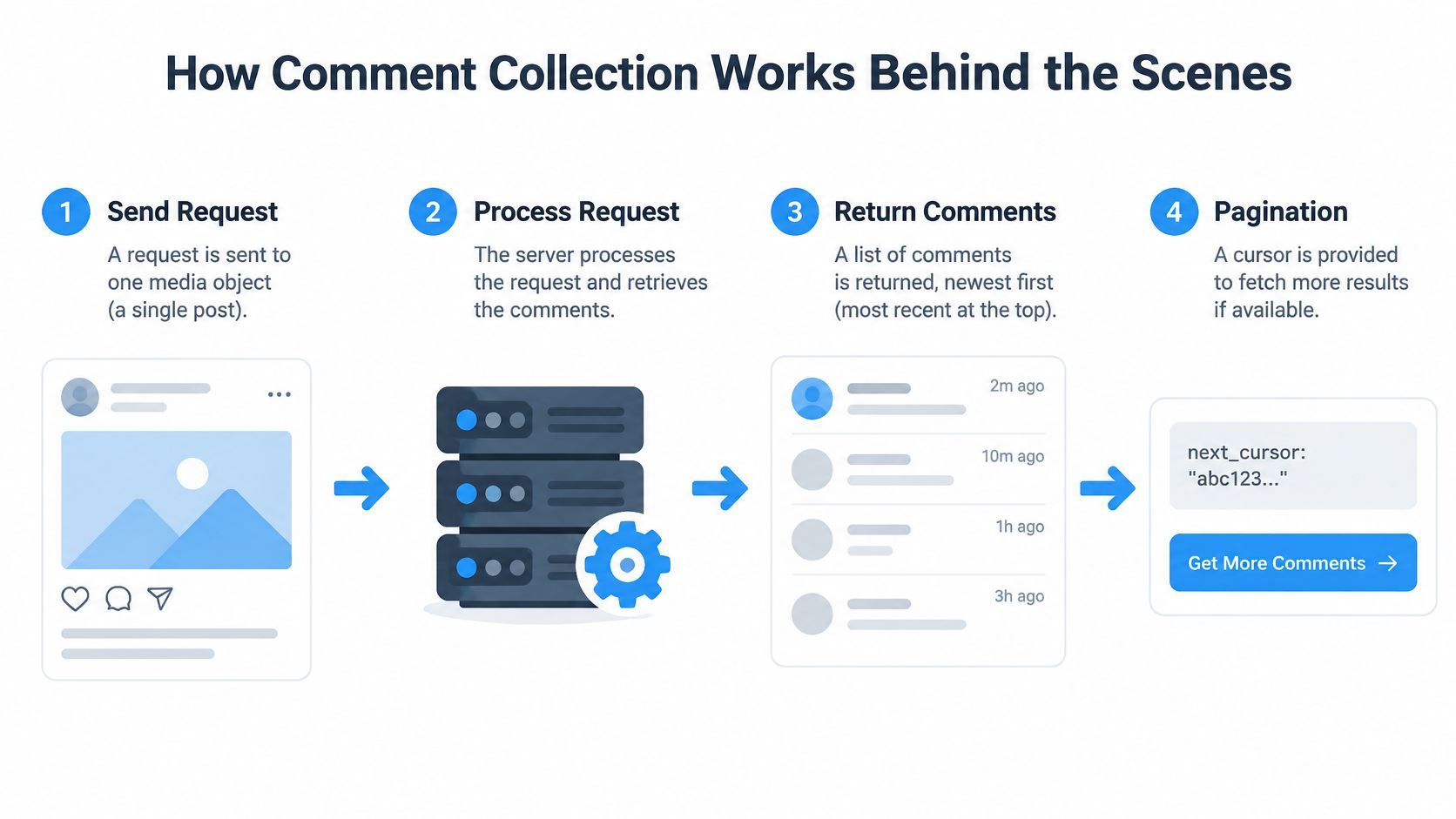
Everything else follows from that page limit. Comments come back top-level only by default, so replies appear only when the replies field is requested through field expansion. There's no timestamp filter, which means a date window gets applied after collection rather than inside the request. Live-video comments sit outside the standard comments endpoint, and comments from some restricted users or age-gated media may not be returned at all. "All comments" and "all comments reachable through official interfaces" are different quantities, and only the second one is a retrieval target.
The practical workflow has five steps, and each one changes how complete the final file is:
- Resolve the post to its media ID. Every later request depends on that identifier, and a wrong ID returns the wrong thread with no warning.
- Pull the first page of up to 50 comments. This is the point where any serious discussion exceeds a single response.
- Follow the next-page cursor until none remains. Stopping early, or hitting a rate limit mid-run, truncates the dataset without an error a spreadsheet will ever show you.
- Request replies separately when the thread matters, because the default response omits them.
- Log post URL, collection time, page count and reply status. Those four fields let a second run be compared with the first.
The endpoint also operates within the permissions of the connected account, so comments on other accounts' public posts arrive through other collection methods with their own ceilings, and those methods need checking against the platform's terms before a run rather than after. Teams that would rather not maintain that plumbing hand it to a social media data extraction service and spend their hours on the filtering steps instead. None of it requires your Instagram credentials, since we never log in to Instagram on your behalf and the service doesn't touch your account at all.
A 50-comment page is a retrieval constraint. It is not evidence that a post contains 50 comments, and any report that conflates the two collapses the first time a client counts the thread themselves.
Which Posts Produce Comments Worth Exporting
Ninety percent of Instagram users followed at least one business in 2024, according to HubSpot, which is the structural reason brand posts collect commenters who already expect a commercial reply. Choosing the right post matters more than choosing a big one.

Four post types and what each one hands you
- A competitor's product launch. Say a skincare brand posts a new SPF and the thread fills with questions about white cast, restock dates and shipping to Canada. These are the strongest intent signals on the platform, because the commenter is describing a purchase they're trying to complete right now.
- An industry hashtag post. A #dentalmarketing carousel attracts practice owners, agency vendors and job seekers in roughly equal measure. Useful for partnership and vendor research, weak for direct sales, since most commenters aren't in the market for what you sell.
- A giveaway. Hundreds of "done" and tagged friends, all arriving in a burst. The export is large and the intent is close to zero, and the people who wanted a free product are usually the least qualified names in the file.
- A niche creator's review thread. Comments describe what people use and what failed on them, which gives you complaint language and product gaps rather than addresses to email.
Rank candidate posts before you export anything. Choose threads where people ask about the offer, not threads where they only react. Captions do most of that work, because a post that asks one specific question collects specific answers, and teams publishing daily use AI-drafted captions for Instagram posts to keep that question in every caption without rewriting the prompt from scratch.
Do the ranking first. A modest list from a question-heavy thread beats a huge one from a giveaway every time.
How to Turn Comments Into a Prospect List
The output worth building is a list where every row traces back to a post and a date. Eight steps get you there, and each one exists because skipping it changes the answer.
- Write the purpose in one sentence. "Find dental clinics that asked about pricing this quarter" decides every filter that follows and is the first thing a client or a regulator will ask you to produce.
- Pick posts by question density. Record each post URL as you select it, because a post you can't cite later is a row you can't defend.
- Export the minimum fields. Timestamp, text, like count and username are enough to filter; every extra column invites a use you haven't justified.
- Deduplicate by username and keep a comment count. One person who commented ten times becomes one candidate with a count of ten, because duplicates inflate every total between the export and the CRM.
- Filter by profile type. Keep business and creator accounts that match the target and drop private profiles, which can't be enriched and shouldn't be contacted cold.
- Enrich the survivors with public name, bio, category and any published email or phone, in that order, so the cheap fields do the disqualifying.
- Add provenance columns. Source post, collection date and a purpose tag, since without the purpose tag, later use drifts past the reason the data was collected.
- Remove objectors and opt-outs before the first message. A suppression list built after launch is a complaint queue with extra steps.
This is the same pipeline our guide to Instagram lead generation describes for follower audiences, applied to commenters instead, and the sequencing matters more than the tooling.
When the list ships, judge it on revenue rather than replies. Use a holdout group and measure incremental email revenue against it, because a comment-derived segment that lifts opens without lifting sales has told you something about curiosity, not demand.
Separating Buying Intent From Noise in Comments
Scale is exactly the problem. Respondology analyzed 118.4 million comments across 734,500 posts and more than 450 brands in 2025 research, and a 2026 report found that 47% of surveyed consumers held brands responsible for toxic or spammy comments, based on an analysis of 168.8 million comments across 7.6 million posts. Comment sections are mostly reaction, and only a fraction of that reaction is commercial.
| Comment Type | Example | What to Do |
|---|---|---|
| Purchase question | "Does this ship to Canada?" | Keep and prioritize |
| Product complaint | "My order never arrived" | Route to support, do not contact as a prospect |
| Competitor promotion | "Try our brand instead" | Exclude |
| Giveaway entry | "Done, tagged two friends" | Exclude from intent lists |
| Emoji-only reply | "🔥🔥🔥" | Exclude |
| Bot or spam link | Repeated link from new account | Remove |
| Duplicate commenter | Same username on many posts | Merge into one candidate with a count |
| Hostile or abusive comment | Insulting or threatening text | Exclude and flag for review |
Classification only stays honest if it's auditable, so keep a duplicate flag, a language field and a confidence score on every row. The confidence score is what lets a reviewer sample 50 rows and see whether the rule that kept a comment still looks right a month later. A person who asks a shipping question is a warm signal, not an endorsement of your brand, and never an opt-in.
Filtering decides what's useful. It doesn't decide what's allowed.
That second question has its own authority. The European Data Protection Board's web-scraping guidance states that GDPR can apply when scraping involves extracting, cleaning, structuring and storing personal data, including names and contact details, even when the source is freely accessible. A clean, well-scored, deduplicated list is a better dataset. It isn't a permission slip.
Measuring Coverage and Survival Rate
Two ratios decide whether an export deserves action, and both get logged for every run.
Coverage is what you retrieved against what the post shows
Say a post displays 300 comments and the export holds 180 top-level comments with replies excluded. Coverage is 60% at top level only, and that qualifier belongs in the notes next to the number, not buried in a footnote. If someone else later pulls the same post with replies enabled and gets 240 rows, the difference should be explainable from your log rather than argued about.
Survival rate is what remains after each filter
Start with 1,000 exported rows. Deduplication and relevance filtering take it to 620. Contact validation, where an address has to be present and plausible, takes it to 410. Suppression removes the last 30, leaving 380. That's a 38% survival rate, and it's a far more useful number than the export count, because it prices in the work between a raw file and a sendable list.
Log every run: coverage, survival rate, page count and reply status, recorded next to the post URL.
Those four values turn collection into something comparable. Run the same process on a second post and the differences point at the audience or the method, not at mystery. Without them, every discrepancy looks like the scraper failed, when the usual cause is a page limit, a dropped reply thread or a filter applied in a different order.
Public Data, Consent and GDPR Limits
The assumption worth attacking first is that a public comment is a permitted lead. Public visibility is where the analysis starts. It settles almost nothing about what you may store, enrich, import or email.
Six checks do the actual work, and each one has an owner and a document behind it:
- Purpose limitation: the reason you collected the data is a boundary, not a starting point, so a list gathered to study pricing questions can't become a newsletter audience.
- Lawful basis: name it in writing per campaign before the first row is collected, because the answer differs between a legitimate-interest B2B outreach file and a consumer list.
- Transparency: people are entitled to know their comment became a record, which usually means a short privacy notice rather than a hidden process.
- Data minimisation: a username and a published business email are enough; a scraped personal mobile number is a liability with no matching benefit.
- Retention: set a deletion date when the campaign is planned, not when someone remembers the file exists.
- Objections: honour them immediately and permanently, and keep the suppression list separate so it survives the next export.
Take a concrete case. A name taken from a comment on a competitor's post, combined with an email published in the same person's bio, is personal data even though both halves were visible to anyone. Load that pair into a CRM, match it to a campaign and send a sequence, and you've moved from reading a public conversation to processing personal data for marketing. That's the step where the risk concentrates, and where whether web scraping is legal stops being an abstract question.
Marketing rules also vary by country, so the same file can be defensible in one market and unsupportable in another. The contrarian conclusion is worth stating plainly: the most valuable feature of a comment workflow isn't volume, it's documented provenance and controlled use. A smaller list with a stated purpose, a lawful basis, a retention date and a working objection process will survive scrutiny that a 50,000-row export never will.
Practical sequence: write the lawful basis, cut the fields to the minimum, set the deletion date, then send.
Choose a Method and Run a Small Test
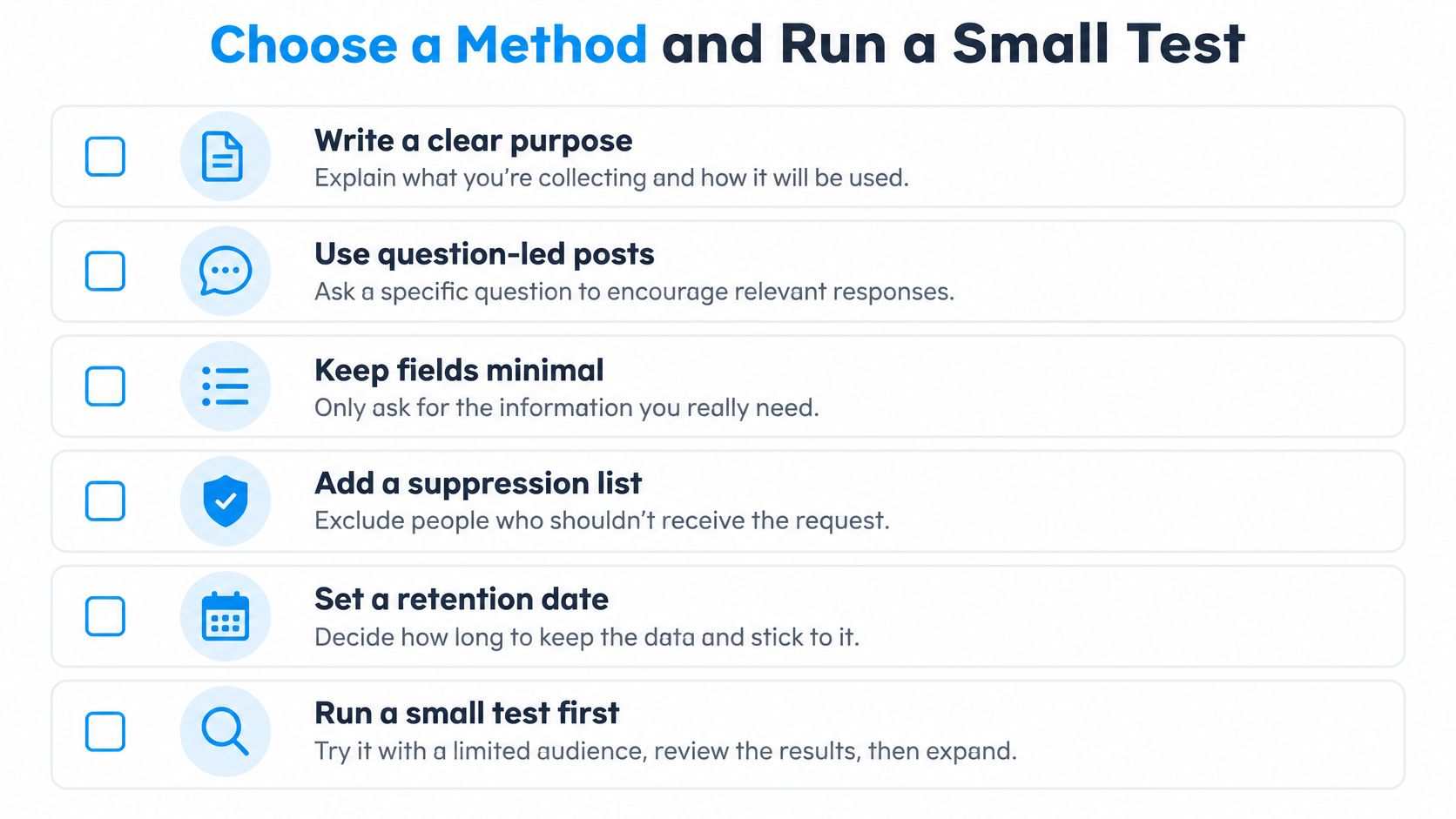
Set the scope before the first run. Retrofitting purpose, retention and a suppression list onto a finished file costs more than building them in at the start, and the method you pick decides how much of that work you personally own.
| Method | Control | Pagination and Reply Rules | Setup Effort | Best For |
|---|---|---|---|---|
| Self-built collector | Full control over fields and storage | You handle pagination, rate and reply rules | High | Teams with engineering capacity |
| Managed service (HarvestMyData) | Choice of source and public profile fields | Handled by the service | Low | Sales teams testing comment-based prospecting |
A self-built collector makes sense when you need custom fields or on-premise storage and have someone who can absorb the pagination and reply rules without dropping them. Everyone else buys time. HarvestMyData is our automated Instagram email scraper, which extracts publicly listed emails and phone numbers from Instagram followers, following lists and hashtags. Customers choose a source, including comments, likers or a location, then enter a public Instagram username or profile link and receive a CSV.
The next step is small on purpose. Run one post end to end, confirm that every row carries its provenance columns, check that the surviving profiles match the target you wrote down in step one, and compare the survival rate with the estimate you made before collecting. Scale to a second post only when the first one produces a number you'd be willing to explain.
If you'd rather spend your time on filtering and compliance than on pagination and reply fields, HarvestMyData takes a public post, hashtag or profile and returns a structured file of publicly listed contact details, delivered as CSV or Excel. You choose the source, including the commenters on a specific post, and we handle collection without touching your Instagram account. Start with one question-heavy post, check the survival rate, and decide from there.
We built HarvestMyData to handle all of this for you.
No proxies, no code, no account needed.