How to Export Instagram Followers: Guide to CSV 2026
Most advice on how to export Instagram followers starts in the wrong place. It treats the job as a file-conversion problem, as if the goal were merely turning a follower list into CSV.
That's rarely the actual business need.
Agencies, SDR teams, and founder-led growth teams don't need a spreadsheet full of usernames. They need an actionable list they can sort, segment, enrich, and use for outreach. If you searched for Instagram email scraping, that's the practical end state: not a raw dump, but a clean prospecting asset with context attached.
Table of Contents
- What a professional export should produce
- Manual copying breaks fast - What Instagram's own export actually gives you - Why native export falls short for outreach
- Three tool categories that matter - Instagram Follower Export Methods Compared - Why cloud-based scraping fits agency work
- Start with the right target account - Choose followers or following on purpose - Configure the export for usable output
- Clean the file before you contact anyone - Segment by business intent, not vanity
- What responsible teams actually do - What to avoid
- Can I export followers from a private Instagram account - Is Instagram's own export enough for lead generation - What should I export besides usernames - How do I avoid spammy outreach after Instagram email scraping - Should I scrape followers or following
Why Exporting Followers Is the Wrong Goal
A follower export by itself usually isn't valuable. A CSV of usernames can tell you who exists in an audience, but it doesn't tell your team who fits your offer, who looks like a business buyer, who lists contact details publicly, or who should never enter an outreach sequence.
The useful question isn't “how do I export Instagram followers?” It's “how do I build a list my team can act on today?” That changes the method completely. Once the end goal is outreach, segmentation, or partnership sourcing, data quality matters more than raw extraction.
A plain export gives you handles. An enriched export can give your team context like names, bios, website links, public profile signals, and business clues that make filtering possible. That's the difference between a research file and a prospecting asset.
Practical rule: If the file can't be filtered into segments your team can message differently, it isn't finished data.
However, much free advice proves insufficient. It teaches collection, not qualification. Marketers then end up with bloated spreadsheets that look impressive and perform badly because nobody separated creators from consumers, businesses from hobby accounts, or relevant niches from noise.
For agencies running Instagram ads or outbound campaigns, the smarter workflow is to combine audience extraction with campaign intent. If you're mapping audiences for paid acquisition, creative strategy matters too, and Kelpi's Instagram ad recommendations are a useful companion resource because they help you align audience research with what you'll put in front of that audience.
What a professional export should produce
- A sortable file: CSV, Excel, or JSON that works in a spreadsheet or CRM.
- Profile context: Enough public data to distinguish likely buyers from irrelevant accounts.
- Clean segmentation paths: Clear ways to split creators, local businesses, niche operators, and broader consumer accounts.
- Outreach readiness: Data your sales or partnerships team can review without manually opening every profile one by one.
That's the standard. Anything less is just a list.
Manual and Native Instagram Data Export Methods
Free methods sound attractive until you try to use them on a real campaign. They're fine for curiosity. They're weak for operations.
Manual copying breaks fast
Manual collection means scrolling follower lists, opening profiles, copying usernames into a sheet, and then doing a second pass to add context. For a business team, that process fails for three reasons.
- It's slow: One person becomes the bottleneck.
- It's inconsistent: Different team members label profiles differently.
- It's shallow: You end up capturing only what someone had time to notice.
Manual work can still help with a tiny handpicked list, especially when an account manager wants to sanity-check a niche before buying data. But once the job involves competitor audiences, influencer prospecting, local business outreach, or recurring lead collection, manual export stops being a method and starts being waste.
What Instagram's own export actually gives you
Instagram does provide a native account-download flow. Scravio's walkthrough describes the path as Menu → Settings and privacy → Accounts Center → Your information and permissions → Download your information → Some of your information → Followers and following, with the file available in HTML or JSON after Instagram prepares it, which establishes the baseline first-party way to export your own follower-related data through the platform's permission-based flow for account owners rather than public-audience scraping (Scravio's Instagram follower export walkthrough).
That matters historically because it was the first broadly available native route. It also tells you what Instagram considers acceptable: your own account data, delivered through a controlled export process.
Why native export falls short for outreach
Instagram's official export is not built for agency prospecting, competitor research, or rapid list building. The official help flow routes users through Accounts Center → Your information and permissions → Export, and one documented example reported a 6–7 hour wait before the follower data file was ready (Instagram Help on downloading your information).
Even when the file arrives, the output is still only the starting point. Marketing teams then have to parse HTML or JSON, normalize fields, and figure out which accounts matter.
Native export is an ownership feature, not a prospecting workflow.
That distinction gets missed in search results. Many articles treat “export followers” as one problem, when there are really two separate jobs:
- Download your own account data
- Collect usable audience data from a public account for analysis or outreach
The first is what Instagram supports natively. The second is why third-party tools exist.
For agency use, the native route has three practical limits:
- Scope restriction: It's for your account data, not a competitor's public audience.
- Delayed delivery: The platform prepares the archive on its own timeline.
- Poor handoff to outreach: The file usually needs cleanup before a sales or marketing team can use it.
If your team needs a historical backup, native export is worth knowing. If your team needs a list for lead research this week, it's the wrong tool.
Automated Tools for Professional Follower Scraping
The useful part of this market is no longer “can I get the data?” The key question is which delivery model creates the least operational friction while producing a file your team can use.
Three tool categories that matter
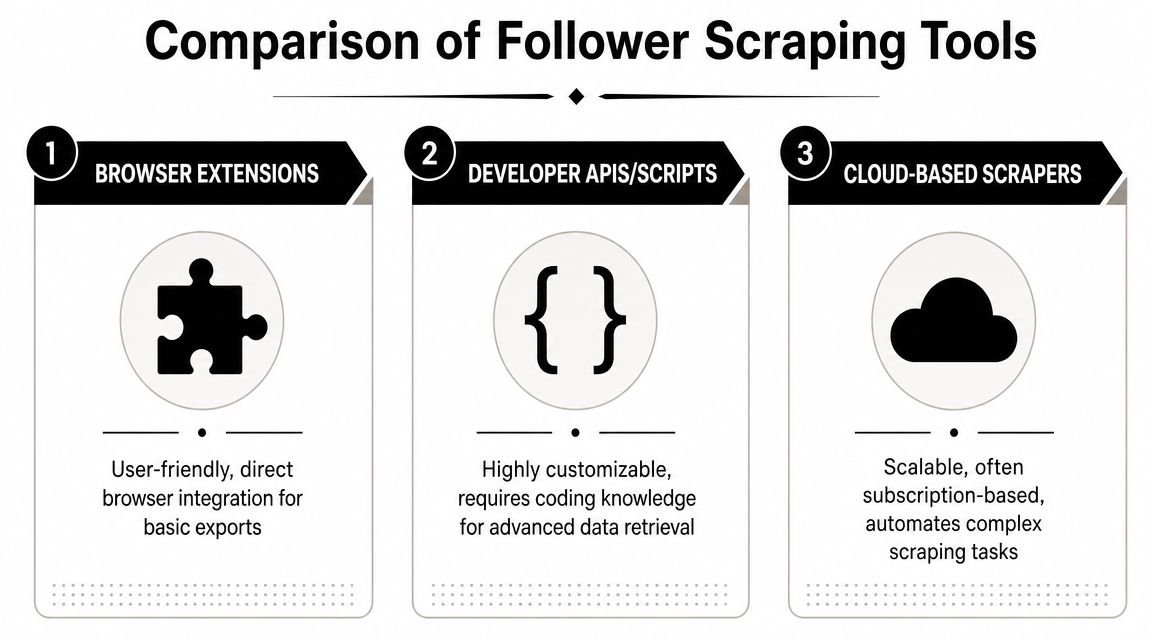
Most professional options fall into three buckets.
Browser extensions
Browser extensions are popular because they feel easy. You install one, visit a profile, click export, and hope the browser does the rest. Some can output lists in a familiar format and may offer basic enrichment.
They're still limited by the browser environment. Sessions break. Tabs crash. Local machines become the runtime. If the extension depends on your logged-in activity or your device staying open, the workflow becomes fragile. That's manageable for one-off research. It's weak for repeatable agency delivery.
A related issue is that extensions often blur the line between lightweight export and full scraping. Teams that start with a “simple export” extension often end up wanting more automation later. At that point, they're already rebuilding process.
If you want a broader look at the trade-offs in extension-based collection, this breakdown of extractor extensions is useful because it explains where browser tools fit and where they become operationally awkward.
Developer APIs and scripts
APIs and custom scripts appeal to technical teams because they offer control. You can define inputs, chain jobs, feed outputs into internal systems, and automate repeat runs. If your agency has engineering support, that flexibility can be valuable.
But scripts come with ownership cost. Somebody has to maintain the code, monitor failures, handle changing page behavior, and manage the infrastructure around scraping. That's not just a tooling choice. It's an internal process commitment.
For many agencies, the issue isn't whether scripts can work. It's that they pull a marketing workflow into an engineering queue.
Cloud-based scrapers
Cloud tools remove most of that overhead. The platform handles the job remotely, processes the target audience, and returns a downloadable file. That model fits agencies because it separates data collection from the operator's machine and avoids turning every export into a mini technical project.
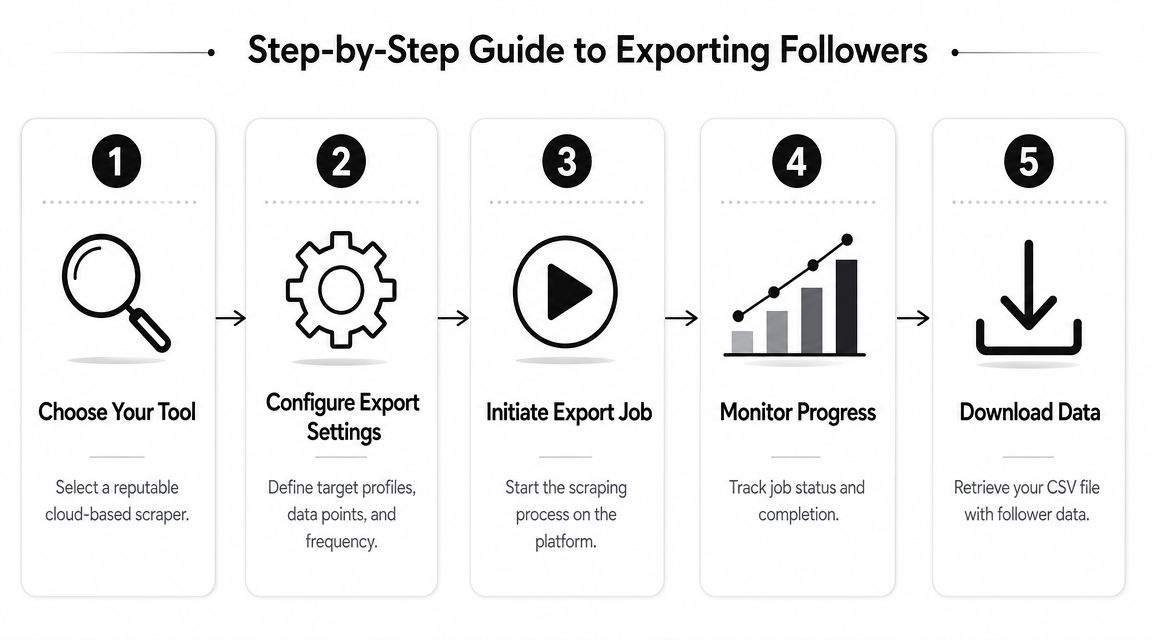
This is also where the modern export workflow has become more standardized. One tool listing describes the common process as entering a public Instagram username, choosing followers or following, optionally adding profile enrichment, and then exporting to CSV, Excel, or JSON. It also notes that enrichment takes longer because the system has to request data for each user profile (IGFollow on the Chrome Web Store).
Instagram Follower Export Methods Compared
| Method | Speed | Data Quality | Safety Risk | Scalability |
|---|---|---|---|---|
| Manual collection | Slow | Low and inconsistent | Low platform automation risk, high human error | Poor |
| Native Instagram export | Delayed because the archive must be prepared | Structured, but limited to your own account data | Low | Poor for prospecting |
| Browser extensions | Faster than manual work | Varies by tool and browser session quality | Moderate operational risk | Limited |
| Developer APIs/scripts | Can be efficient with maintenance | Potentially strong if well-built | Depends on implementation | Good for technical teams |
| Cloud-based scrapers | Fast and operationally simple | Strong when enrichment is included | Lower operator friction | Strong |
Why cloud-based scraping fits agency work
Teams that do this seriously usually settle on cloud delivery for plain reasons:
- No local babysitting: Nobody has to keep a browser tab open.
- Cleaner handoff: The output is built for spreadsheets and downstream review.
- Less technical drag: Strategists and SDRs can run jobs without waiting on a developer.
- Better fit for enrichment: The same workflow can pull more than just usernames.
IGExport says its web tool can export a public account's followers or following list to CSV in under a minute, while DolphinRadar describes a 3-step flow of entering a username, selecting followers or following, then downloading, with exports starting in seconds and no Instagram login required. PhantomBuster adds that exports can include fields like username, name, profile page URL, and privacy setting, which makes the output more suitable for spreadsheet analysis than simple copying (IGExport's public account export page).
One cloud-based option in this category is HarvestMyData, which is described by the publisher as an Instagram email scraping service that works from public followers, following lists, and hashtags, then returns a CSV with public contact and profile fields without requiring proxies, logins, or software. That model is much closer to what agencies need than a raw follower dump.
The professional benchmark isn't “can this export usernames?” It's “can my team turn the file into outreach without rebuilding the data by hand?”
Running Your First Follower Export Job
A good export starts before you click anything. Most bad files come from bad targeting, not bad tools.
Start with the right target account
Pick a source account that reflects the audience you want to reach, not just a famous name in the category. A massive celebrity account often produces a broad, low-intent audience. A niche creator, regional brand, industry educator, or competitor usually produces a much more usable pool.
Strong targets often include:
- Direct competitors: Their audience already understands the category.
- Industry educators: Followers tend to be actively interested, not casually entertained.
- Tool partners or adjacent brands: Useful for partnership and affiliate outreach.
- Local niche accounts: Better when geography matters.
Before running a full export, inspect the public profile manually. Read the bio. Scan recent comments. Check whether the account attracts buyers, creators, businesses, or general consumers. That quick review prevents a lot of wasted collection.
Here's a visual walkthrough of a common workflow:
Choose followers or following on purpose
This choice affects lead quality more than many people expect.
Followers are usually the right choice when you want potential customers, audience overlap, or creator discovery around a known brand or niche account. You're looking downstream at who pays attention.
Following is often stronger when you want curated relevance. An account's following list can reveal who they watch, partner with, learn from, or benchmark against. In B2B and creator outreach, that can be more targeted than the follower list.
Following lists often behave like hand-built directories. They show intentional interest, not passive audience accumulation.
If you're learning how to export Instagram followers for outreach, don't assume followers are always the better dataset. Test both sides of the graph.
Configure the export for usable output
Once the target is chosen, keep the job focused. Don't request every possible field just because a tool offers them. Ask for the fields you'll use to filter and prioritize.
A practical setup usually includes:
- Core identifiers: Username and name.
- Public profile context: Bio, website, category, and privacy status if available.
- Commercial hints: Public contact details where listed, plus business-facing signals.
- Reach indicators: Follower counts or related public profile fields.
- Export format: CSV first, unless your workflow specifically needs JSON.
If the tool supports enrichment, use it when your end goal is outreach rather than simple audience analysis. The common professional workflow is straightforward: enter the public username, choose followers or following, enable enrichment if needed, then download the file in the format your team uses most.
The smart move is restraint. A targeted export with relevant public fields beats an oversized file your team won't clean.
Transforming Raw Data Into an Actionable Outreach List
The export job isn't the finish line. It's the point where the data becomes usable or useless, depending on how your team handles it.

Clean the file before you contact anyone
Start by removing obvious junk. Private personal accounts, empty bios, meme pages, unrelated hobby profiles, and duplicate-style entries drag down outreach quality. Even when the export came from a relevant audience, not every profile belongs in the same campaign.
A simple review pass should answer:
- Is this account a likely business, creator, or customer fit?
- Does the profile show enough public context to personalize outreach?
- Is there a visible website, business category, or bio keyword that supports relevance?
If your workflow includes public contact collection from follower audiences, then a guide like how to find emails from Instagram followers becomes useful. The main point isn't volume. It's matching publicly listed contact details to the right segment instead of treating every row as equal.
Segment by business intent, not vanity
The best use of an enriched export is segmentation. Don't sort the sheet by popularity and call it a day. Sort it by buying relevance, campaign fit, and likely response quality.
For example, if you sell software to real estate professionals, filter the bio and category fields for terms tied to that market. If you're sourcing creators for brand deals, look for profiles with clear niche identity, business websites, and a creator-style bio rather than broad lifestyle accounts.
A few strong segmentation ideas:
- By niche language: Terms in bio like service category, profession, or audience focus.
- By business maturity: Presence of website, structured bio, and brand-like profile signals.
- By collaboration potential: Creator-style accounts with visible niche specialization.
- By local relevance: Profiles signaling city, region, or country when that matters.
If you're building an influencer outreach workflow rather than a cold outbound list, it also helps to understand how teams select the ideal influencer platform. That decision shapes what kind of exported data matters most, especially when you're balancing direct outreach with platform-managed relationships.
A raw list answers “who's there?” An outreach list answers “who should we contact first, and why?”
That's the practical difference between scraping for curiosity and scraping for pipeline.
Navigating Legal Best Practices and Platform Rules
Teams get sloppy here when they focus only on technical access. That's a mistake. Professional use of Instagram audience data requires two separate judgments: what a tool can pull, and what your team should do with it.

Instagram's platform rules have their own boundaries around automated collection. Separately, privacy laws and outreach rules affect how you store, segment, and use publicly available business data. Those are different layers of risk, and serious teams treat them that way.
What responsible teams actually do
Responsible collection usually starts with public profiles and a narrow commercial use case. A B2B team sourcing business accounts, creators, or public-facing professionals is in a different position from someone trying to harvest personal data indiscriminately.
Good practice usually looks like this:
- Focus on public business or creator profiles: These accounts are already presenting themselves for discovery.
- Keep the purpose specific: Prospecting, partnership sourcing, or market research are easier to govern than vague “collect everything” projects.
- Respect opt-outs and non-response: If someone doesn't want contact, remove them.
- Use context in outreach: Reference a niche, service, or profile signal that makes your message relevant.
- Store only what your team needs: Extra data creates extra compliance burden.
If your team also uses website enrichment alongside Instagram-sourced audiences, this article on extracting website data is useful because it helps structure a cleaner downstream research process instead of dumping unrelated fields into one file.
What to avoid
The riskiest behavior is usually obvious.
- Don't target private accounts
- Don't present scraped data as consent
- Don't blast generic outreach to every row in a file
- Don't hide who you are or why you're contacting someone
- Don't keep stale lists forever without review
For teams working specifically with public business contact details on Instagram, SponsorRadar's guide to Instagram email finding is a useful read because it frames the practice around publicly listed contact paths rather than covert data gathering.
The safest posture is simple: use public data carefully, limit collection to legitimate business cases, and make sure your outreach would still look reasonable if a prospect forwarded it to a colleague.
Frequently Asked Questions About Instagram Exports
Can I export followers from a private Instagram account
Not in a responsible professional workflow. Private-account collection raises both technical and ethical problems. For agency use, stick to public profiles and public audiences.
Is Instagram's own export enough for lead generation
No. It's useful for downloading your own account information, but it isn't designed for competitor audience research or building an outreach-ready list.
What should I export besides usernames
For outreach, the useful fields are the ones that help with qualification and personalization. Public bio data, business context, website fields, and similar profile signals are much more valuable than a plain username file.
How do I avoid spammy outreach after Instagram email scraping
Use the exported data to segment tightly. Write messages that clearly connect to the person's niche, role, or profile context. If the message could go to anyone on the list unchanged, it's too generic.
Should I scrape followers or following
It depends on intent. Followers often surface audience demand. Following often reveals curated relevance. Good teams test both and compare which side produces stronger prospects.
If you need more than a raw export, HarvestMyData is built for the practical version of this job: collecting public Instagram audience data and turning it into a clean file for sales, partnership, and marketing workflows. For teams doing Instagram email scraping, the value isn't in getting “a list.” It's in getting a usable one fast enough to act on.
We built HarvestMyData to handle all of this for you.
No proxies, no code, no account needed.