Find Email Associated with Instagram: A Safe 2026 Guide

The advice you'll find on nearly every page about this topic is identical. Open the profile, tap Contact, copy whatever address appears, paste it into your sequence. Three clicks and you're prospecting.
That advice falls apart the moment you run it against a real list of 200 profiles. Most accounts don't show a Contact button at all. Some bios hold an address that belongs to an agency rather than the creator. A few addresses bounce on the first send. And a handful were never published for business contact in the first place, which turns a neat growth tactic into a compliance problem.
I treat every address pulled from Instagram as a lead to classify, not a contact to email. That one shift separates a list that gets replies from a sending domain that gets flagged.
Table of Contents
- Where the addresses actually sit
- What a clean result looks like
- Run the checks in the order a list fails them
Where Public Emails Show Up on Instagram
Instagram has no universal email field. There's no directory to query and no lookup that returns a hidden address. An email appears on a profile only because the account owner typed it somewhere public, which is why the same routine returns three addresses on one account and nothing across the next dozen.
Instagram's data policy covers information processed across Instagram and other Meta products, and the platform's terms make clear that using the service means accepting that policy while users decide what to share through their privacy and security settings. Instagram also states that posting private and confidential information violates its Terms of Use. A visible address sits on the public side of that line. A business or creator published it deliberately. It isn't waiting on every profile, and it isn't a doorway to hidden personal details.
That's why the honest framing of find email associated with Instagram work is public-data verification. You check what's there, you record it, and you stop where the public record stops.
Where the addresses actually sit
| Source | Where to look | What it tells you |
|---|---|---|
| Contact button (professional account) | Tap Contact on the profile | The address the owner chose to display publicly |
| Bio text | Email or business line in the bio | Often a general inbox such as info or hello |
| Website in bio | External link on the profile | Points to a site where an address may be listed |
| Link-in-bio page | Landing page with a contact or about section | Can list several addresses for different teams |
| Linked Facebook Page | About or contact section of the connected Page | The address may differ from the Instagram one |
| Personal account without contact options | Profile, bio and links | Usually nothing to find, so stop here |
Two rows deserve a second look. The Contact button is the strongest signal on the page, because a professional account has to switch it on and can switch it off again, which makes it an active decision to be contacted for business. A personal account with no contact options sits at the other end. Many profiles land there, and finding nothing is a normal result, not a failure of your method.
The one habit that matters: log the profile URL and the capture date the moment you copy an address. An email you can't trace back to a page is an email you can't defend six months later.
Do that before anything else happens to the record. The date tells you when to recheck, and the URL tells a reviewer exactly what the account owner published.
How to Check a Profile in Five Steps
The check takes about ninety seconds per profile once the routine is in your hands, and most of that time is spent deciding what you're looking at rather than searching for it.
Account metadata and contact data live in different places, and the panel below shows how much of a contact email stays hidden even when you know where to look. 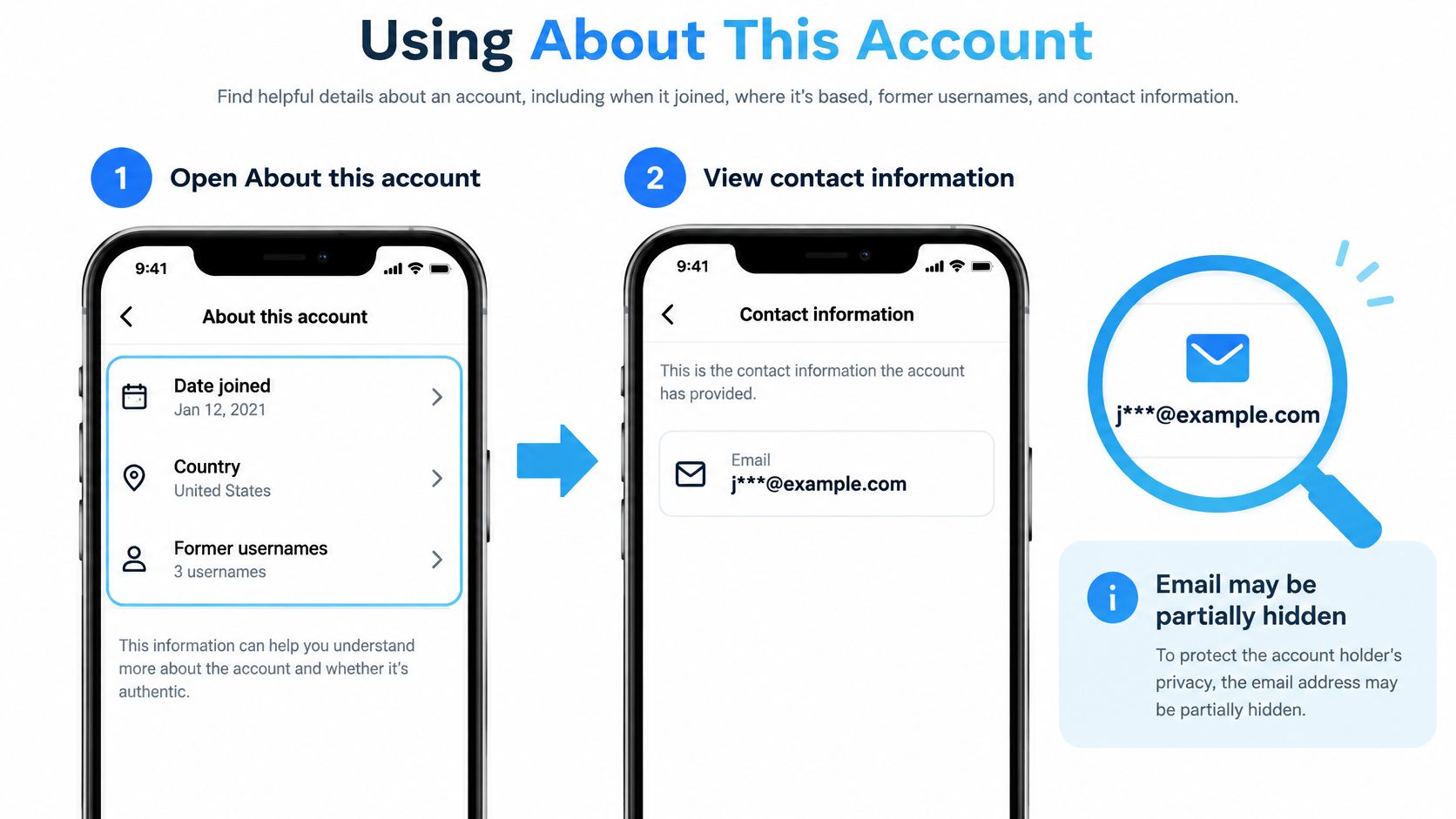
- Open the profile and note the basics. Record the username, whether it says Personal, Business or Creator, and the profile URL. The account type tells you whether a Contact button is even possible, so you don't waste minutes hunting for a field the account doesn't have.
- Tap Contact if it appears and copy the address exactly. Note whether it's the only address and whether the domain matches the business. The common slip here is lifting an address out of a comment thread or a third-party directory instead. That breaks the link to the profile and turns a verifiable record into a guess.
- Read the whole bio, including line breaks and emoji separators. Creators often bury a contact line at the bottom of the bio or split it across lines with a symbol. Copy the string exactly as typed, then normalize it later rather than editing in place and losing the original.
- Open the website link and go past the homepage. Check the contact page, the about page, the footer and the terms page, and if the link points to a link-in-bio hub, open every link on it. Plenty of sites list the address only in the footer or inside a contact modal, which is where many visitors quit.
- Log the source, URL and today's date in a sheet before moving on. This is the step people skip when they're moving fast, and it's the one that makes the rest of the list usable. A row without a source is a row nobody can review.
What a clean result looks like
One or two addresses, each tied to a named source, sitting on a domain that matches the business, with a date beside it. Anything beyond that is either a duplicate or a lead that needs a second look.
Audience Discovery at Scale
A large audience list can contain very few useful contacts. Treat discovery as a way to identify relevant profiles, then assess each public address as a lead before considering outreach.
Start with a defined source:
- A competitor's following list: Often a useful place to look for peer businesses and suppliers.
- Your own following list: A relevant audience to review for accounts you already know.
- Commenters on a local or niche hashtag post: Their comments can help you judge whether an account fits the audience.
- Likers of a specific post: A noisier source, but the post's subject can help you assess relevance.
Following lists almost always produce better email rates than follower lists. Business pages, creators, and coaches also tend to list public emails more often than other account types. Across a mixed audience, about 10% of profiles have public emails on average, though the rate varies by niche. Mega accounts often have lower rates because many followers are casual users.
For a bakery looking for local cafés to approach about wholesale pastries, commenters on a city coffee hashtag may be a more relevant starting point than a broad follower list. Record which post or audience source surfaced each profile, then assess fit before treating any listed address as a contact.
Instagram is widely used for creator work, but audience size alone does not make a list useful. Relevance and the presence of a public business contact matter more than raw profile counts.
You can collect audiences from public profiles without handing over your Instagram login. HarvestMyData extracts publicly listed emails and phone numbers from public Instagram profiles, including audiences drawn from followers, following lists, hashtags, comments, and likers. For example, its guide to extracting Instagram followers explains one way to source profiles at scale. Confirm that any collection method complies with Instagram's terms before running it at scale. Public visibility does not itself grant permission to contact someone.
Classifying and Verifying Each Address
Treat every address found on Instagram as a lead to classify, not as permission to contact. The first question is whether the profile or its linked website clearly connects the address to a business.
- Direct business contact. An address displayed in a Contact button or bio, with a domain matching the business website. Verify it before considering it for outreach.
- Website-confirmed. The same address appears on the linked site's contact page. Check that the name and business still match.
- Role-based inbox. A shared address such as info, sales, or hello. Mark it for human review because multiple people may read it.
- Unverified association. An address found elsewhere with no clear connection to the profile. Exclude it.
A free email address in a photographer's bio may be a genuine business contact, but the address alone does not establish that. Compare the account name and any linked website. An address copied from an unrelated forum thread has no clear association with the profile.
Run the checks in the order a list fails them
| Check | What it catches | Pass condition |
|---|---|---|
| Syntax | Typos, spaces, missing @ or domain | Valid address format |
| Domain match | A mismatch between the email domain and business website | The domain matches, or a free-mail address is clearly published as the business contact |
| MX record | A domain that cannot receive email | Mail exchange records exist |
| Mailbox check | An address that may be closed or undeliverable | The verifier reports deliverable |
| Disposable domain | Temporary inboxes | Domain is not on a disposable list |
| Catch-all domain | A server that accepts messages for unknown addresses | Mark uncertain and review before use |
Unverified lists can include invalid addresses, disposable inboxes, and catch-all domains that make deliverability difficult to assess. Check addresses before outreach rather than waiting for bounces. A guide to how to validate email addresses explains the checks and their limits.
For a 500-address list, start with syntax and domain checks to remove obvious problems. Then check mailboxes and flag disposable or catch-all domains. A verifier cannot confirm that a person welcomes a message, and a catch-all result does not confirm that a particular mailbox exists.
Run the file through a free lead list cleaning tool to identify duplicates, broken formats, and role addresses. Review flagged rows before acting on them; an address can be technically valid and still be the wrong contact.
Keep the source URL, capture date, and confidence label with each record. Use high confidence for an explicitly published address that matches the business, medium for a linked-site address with matching identity details, and low for an ambiguous association. Deduplicate by normalized email and username, then send low-confidence records for human review.
Decide Whether to Send to Each Address
Treat each public address as a lead to classify, not automatic permission to contact. Send only when the profile or linked website supports a clear business connection and the planned use is lawful where the recipient is located. A profile alone cannot establish that legal basis.
- Keep the source and classification with each record. Include the profile URL and the evidence supporting the match so the decision can be reviewed later.
- Remove addresses that fail verification or have an unclear association. Do this before importing the list into a sending tool.
- Apply opt-outs across every list you hold. Keep a shared suppression record so an opted-out address is not added to another campaign.
- Make the first message identify your business and sender, use a nondeceptive subject line, and include a working opt-out and valid postal address. The FTC's CAN-SPAM compliance guide explains these requirements for commercial email, including business-to-business messages. Senders must honour opt-out requests within 10 business days, and the opt-out mechanism must remain available for at least 30 days after the message is sent.
- Set a review date and check the address again before another campaign. A person may change jobs, leaving an old business address with a different owner or purpose.
Opt-out requests are not always honoured in practice, so keep suppression records current and check them before each send.
For UK and EU recipients, account for data-source disclosure and the right to object to direct marketing. Establish a lawful basis before sending, and use location as a screening factor rather than treating it as a campaign footnote. This guide to GDPR rules for email marketing explains consent, legitimate interest and source disclosure.
Record a decision for every address: send, review or drop. A public business inbox tied to the recipient's work is different from an address that merely resembles one. Classify the evidence, then decide whether the proposed message is appropriate. Public availability does not, by itself, establish permission to contact.
HarvestMyData extracts publicly listed contact information from Instagram business and creator profiles and delivers structured CSV or Excel files. Each profile is checked beyond the bio field for public contact details and profile information. The service does not require an Instagram login, API keys or proxies, and does not access private accounts or protected content. See how HarvestMyData works.
We built HarvestMyData to handle all of this for you.
No proxies, no code, no account needed.