Lead Generation Solution: What It Is and How to Judge Fit

In the HubSpot 2026 State of Marketing research, surveying more than 1,500 marketers globally, 55.7% said generating leads is easier today than it was a decade ago. Over the preceding 12 months alone, 24.5% saw lead volume jump significantly and another 50% reported a smaller climb, yet 30% still ranked lead generation among their top operational challenges.
That gap explains why so many buyers regret their prospecting tools. Gathering thousands of contact rows has become cheap and fast, so most vendor comparisons fixate on total row counts. Turning raw records into qualified sales conversations is a different job altogether.
A credible lead generation solution doesn't stop at exporting emails into a spreadsheet. Speed to first contact, post-export compliance, and cost per usable contact belong inside the solution itself, because any weakness in those three areas turns a full list into wasted sales hours.
Table of Contents
- The Six Capabilities That Separate a Solution From a Scraper
- Running the 500-Profile Sample Test
- Six Quality Checks Before Import - The 50-Record Gatekeeper Rule
- Five Stages From Extraction to First Touch
- Six Post-Export Governance Controls - A One-Page Starting Point for Small Teams
- Four Pricing Models and Their Hidden Costs
- Four Steps to Run an Honest Pilot
What a Lead Generation Solution Actually Does
Finding names is rarely the bottleneck anymore. Qualifying those names, keeping their contact details accurate, and putting them in front of a rep before interest fades is where most prospecting programs stall.
In plain terms, a lead generation solution is an end-to-end system that identifies prospects matching a defined audience, captures the contact details they publish, enriches and verifies each record, and routes usable contacts to someone who can act on them. Think of commercial fishing. A boat locates the school, nets haul the catch aboard, and cold storage keeps the fish fresh until it reaches market. A software tool that only hauls names into a CSV without storage, inspection, or fast delivery fills your warehouse with spoiled stock.

Say a regional roofing company pulls several thousand local business profiles and drops the raw file into a shared drive. Nobody checks whether those accounts own commercial properties, no verifier filters dead inboxes, and reps open the spreadsheet two weeks later. Half the emails bounce, the rest lack context for a relevant opener, and the sales team abandons the file. Service firms avoid that waste when they structure prospecting around buyer intent from the start, as detailed in the Bluelight guide to roofing enquiries.
The Six Capabilities That Separate a Solution From a Scraper
Evaluating a platform starts with checking whether it supports all six operational stages, not just contact extraction. Each capability leaves a concrete operational signal you can verify inside your own sales pipeline.
| Capability | What It Does | Signal It Works |
|---|---|---|
| Audience targeting | Selects the people or businesses that match your ideal customer | Contacts match your ideal customer profile on spot checks |
| Contact capture | Collects contact details the prospect publishes, such as email, phone or website | Most records in the export include a usable contact field |
| Enrichment | Adds bio, category, location and company context to each record | Records carry enough context to segment by campaign |
| Verification | Checks that a contact is valid and tied to the named business | Bounce rate stays low on the first send |
| Workflow routing | Sends records to the CRM or sales queue with source data attached | Leads reach an owner within the team's response window |
| Measurement | Tracks volume, quality and time to first contact by source | Team reviews conversion by audience source every month |
Apply a simple test to any vendor pitch using that table. If a product only counts exported rows, it covers contact capture and hands the remaining five jobs directly back to your team.
Choosing Where Leads Come From
Pressure for bigger pipelines pushes teams into a predictable trap. In 2025, 45% of businesses reported struggling to generate enough leads, according to Sopro's State of Prospecting research. When pipeline looks thin, managers widen audience criteria to chase bigger exports, and relevance collapses immediately.
A practical sizing rule prevents that mistake: define your target audience by exactly three attributes, usually industry, company size, and role. A focused, medium-sized audience that satisfies all three attributes consistently outperforms a massive list stuffed with bystanders, hobbyists, and students.
On social platforms like Instagram, where you source profiles changes both contact yield and buyer intent. Business pages, creators, and coaches publish public email addresses far more often than personal accounts, and smaller niche accounts under 50K followers (typically within a 10K to 250K target band) tend to produce higher email rates than mega-accounts packed with casual fans. Scraping a following list almost always yields better email rates than scraping followers, because accounts curate who they follow far more carefully than who follows them.
| Source | Who It Reaches | Intent Signal | Main Trade-off |
|---|---|---|---|
| Followers of a peer account | People who chose to follow a competitor or peer | Moderate interest in the category | Broad, and quality varies widely |
| Following list | Accounts a relevant brand or creator chose to follow | Often stronger, because the account curated the list | Smaller pool that needs filtering |
| Hashtag posts | Authors of recent posts on a topic | Topic interest, often one-off | Broad, with many off-target profiles |
| Post commenters | People who engaged on a specific relevant post | High engagement in a specific context | Smaller pool, and some commenters are not buyers |
| Post likers | People who liked a relevant post | Light engagement | Large pool with lower intent |
If you're still comparing extraction sources and formats before choosing a channel, reviewing how teams approach web scraping for public leads clarifies which source types match your sales motion.
Running the 500-Profile Sample Test
Never commit a full budget to an untested audience source. Run a controlled sample in five steps before scaling up:
- Lock in your three defining attributes. Write down the exact industry, company size range, and buyer role you want on the list, such as independent fitness studios with 5 to 20 staff run by a founder or head coach.
- Match one audience source to that profile. If your ideal buyers are peer brands that a niche trade supplier tracks, start with that supplier's following list rather than a broad category hashtag.
- Set your pass bar before pulling data. Decide in advance what share of sampled rows must satisfy all three attributes so you aren't rationalizing a weak file after paying for it.
- Pull a 500-profile sample and audit manually. Open the CSV and count how many rows fit your target customer without stretching the rules.
- Scale only if the sample clears your bar. When most sampled profiles read unmistakably like ideal customers, expand the order; otherwise, swap the source and retest.
Pre-commit rule: Write down the minimum share of your 500-profile sample that must match all three attributes before you pull the file. Deciding what counts as "good enough" after inspecting the export invites wishful thinking.
Checking Record Quality Before Records Reach Sales
Dirty prospect records never stay neatly quarantined inside a downloaded spreadsheet. Once imported into HubSpot, Salesforce, or Pipedrive, bad rows pollute reporting, trigger bounces, and create legal exposure. In the Validity 2026 State of CRM Data Report, 63% of marketers reported that poor CRM data contributed to compliance gaps or privacy-risk exposure, including stale consent records, missed opt-outs, and duplicate profiles.
Raw profile exports also lack the structured business context reps need to prioritize outreach. Teams that pair extraction with structured contact data enrichment catch mismatches before reps burn hours on dead ends. The same discipline applies across high-value service sectors, where SimpleLab Digital's breakdown of how to qualify attorney inquiries shows how checking concrete fit criteria early keeps sales capacity focused on real opportunities.
Six Quality Checks Before Import
Run every fresh export through six verification gates in order before syncing a single contact to your CRM:
- Confirm provenance and capture time. Verify that every field traces back to a real source profile and record the exact retrieval timestamp. If an export lacks a profile URL and collection date, you can't audit where a contact originated later.
- Tag inferred fields separately from stated facts. A city or website typed directly into a bio is user-provided data; a country guessed from a phone prefix or bio wording is an inference and belongs in its own labeled column.
- Check business-to-contact alignment. Spot mismatches between the bio and the email domain, such as a profile describing an independent architecture firm whose listed email still points to a previous employer's corporate domain.
- Verify deliverability before bulk sends. Pass email addresses through a verifier like ZeroBounce or NeverBounce, or run a small controlled batch first, so invalid inboxes don't damage your sending domain reputation.
- Deduplicate across runs and existing CRM records. Two related hashtag exports frequently capture overlapping accounts. Merge duplicates against both your previous exports and your live CRM database so two reps don't pitch the same founder on the same afternoon.
- Screen against your internal do-not-contact list. Strip out existing customers, active deals, competitors, and prior opt-outs before anyone loads the file into a sequencing tool.
The 50-Record Gatekeeper Rule
Say you pull a hypothetical 1,000-row export across two overlapping niche hashtags. Deduplication strips out 200 repeated profiles, and domain checks catch 40 mismatched business emails, leaving 760 trustworthy records ready for outreach.
You don't need to inspect every row manually to judge file health. Pull a random 50-record slice from the export and count how many rows clear all six checks cleanly. If the pass rate looks weak, narrow your audience source rather than buying larger exports to compensate.
Workflow Speed From Capture to First Contact
Even a spotless contact list loses value while sitting idle in an inbox or waiting for manual CSV cleanup. An analysis of 1.25 million leads across 42 firms (paired with an audit of 2,241 U.S. companies) from Harvard Business Review, highlighted in the Callingly speed-to-lead study, found that companies contacting a web-generated lead within one hour were roughly seven times more likely to have a meaningful conversation with a decision-maker than teams that waited an extra hour, and about 60 times more likely than teams waiting 24 hours.
The visual below traces how fast capture, routing, and outreach combine to drive that qualification lift.
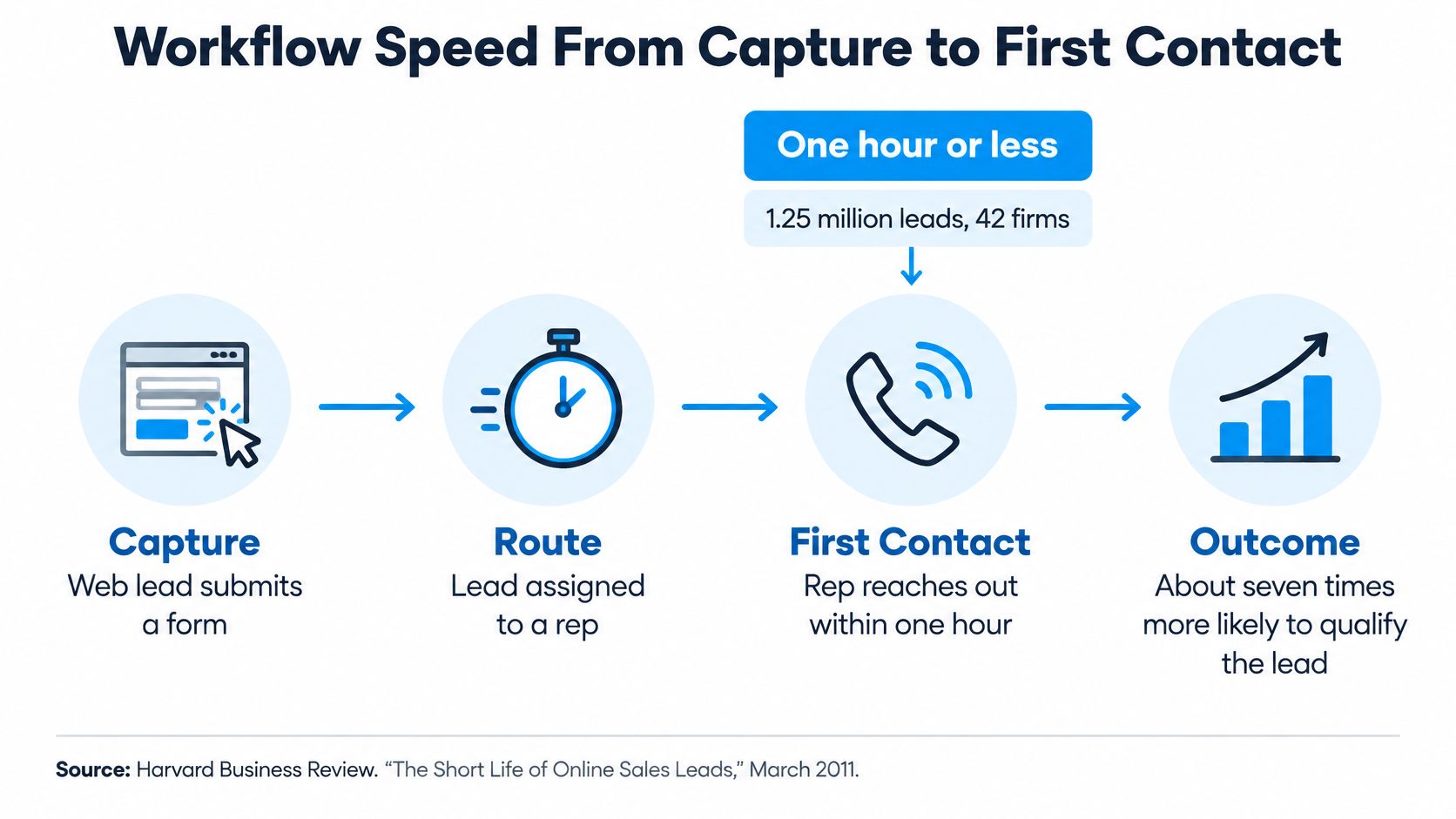
Speed isn't solely a sales rep metric. It's a property of the whole pipeline from extraction to first touch. When marketing measures export completion and sales measures sequence reply times separately, days disappear in the handoff between them.
Five Stages From Extraction to First Touch
Build your workflow so every record moves smoothly through five connected stages:
- Capture with full source metadata. Save the audience type, username, bio, category, and collection timestamp alongside the email or phone number. That metadata tells downstream tools how to segment the lead without manual lookups.
- Validate and deduplicate immediately. Run automated verification, CRM matching, and suppression checks the moment the file lands. Waiting for a Friday cleanup batch guarantees missed response windows.
- Route by segment to a named owner. Send high-context profiles like post commenters straight into a specialized outreach queue, while broader follower lists enter an introductory nurture track. Generic blasts waste the context you just captured.
- Deliver the first touch inside your target window. Trigger the opening email or call as soon as routing finishes so outreach feels timely and relevant. Automated file delivery and live progress tracking let ops teams prep CRM imports while processing runs, shrinking dead time between extraction and action.
- Log outcomes back to the audience source. Record replies, meetings booked, and disqualifications against the original source tag. Without that loop, you can't tell which audiences produce revenue and which only inflate CRM counts.
Say a hypothetical 2,000-record export arrives on Monday morning, ready for outreach. If manual spreadsheet formatting and hand-assignment to reps take two full business days, first contact misses the response window completely even though the extraction tool finished fast.
For a practical look at structuring fast handoffs and keeping follow-up consistent inside sales operations, watch the walkthrough below.
Measure capture, validation, routing, and first outreach as one continuous clock. Separate departmental timers hide the exact handoff delays that kill conversion rates.
Pick one realistic response window your team can hold consistently, such as the same business day, and review that single capture-to-first-contact latency metric every week.
Compliance and Governance After Export
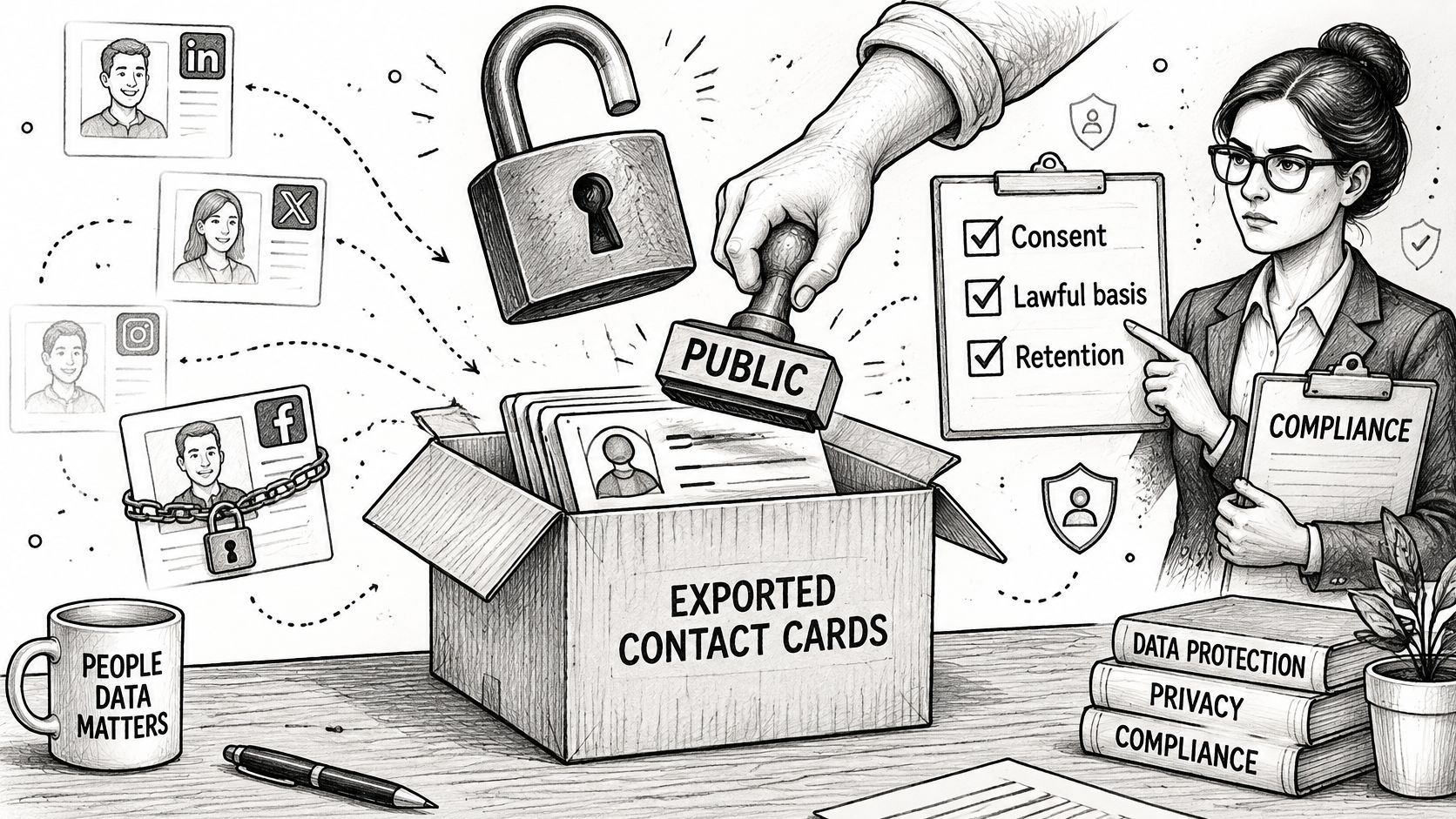
Many small teams assume that publicly visible contact information carries zero privacy obligations. If an email sits right on a public Instagram bio, why would data protection rules apply?
Guidance from the UK Information Commissioner's Office on collecting information and generating leads directly refutes that assumption. The ICO confirms that publicly available information includes websites and social media, yet organizations must still ensure collection and use remain fair, lawful, and transparent, notify individuals that their details were obtained, and explain the intended direct-marketing purpose. The ICO also clarifies that UK GDPR can apply even when publicly visible data identifies an individual in a business context.
Public availability and permission to contact are two separate questions. Legal risk depends on jurisdiction, outreach purpose, channel, business context, and how you store and reuse records after export. Any exported contact data must be used strictly for lawful purposes, follow anti-spam regulations such as CAN-SPAM and GDPR, and respect opt-out requests across every channel where a prospect's record appears.
Six Post-Export Governance Controls
Treat governance as a built-in layer of your prospecting workflow by enforcing six straightforward controls on every export:
- Store the source profile URL and retrieval timestamp: Keep exact provenance attached to each row so you can answer any "where did you get my email?" inquiry accurately within minutes.
- Record a lawful-purpose assessment per audience: Before contacting a segment, write down why your offer is relevant to that business group and which legal basis applies in their region.
- Separate business indicators from uncertain personal data: Flag clear company emails and business categories distinctly from personal webmail addresses where commercial context is unclear.
- Maintain a central suppression list across every export: Sync unsubscribes, bounces, and objections into one master blocklist applied automatically before every new import.
- Restrict downstream sharing: Limit who can download raw CSVs, and avoid forwarding contact exports to third-party contractors or ad platforms without documented approval.
- Enforce retention and deletion dates: Set a calendar rule to purge unengaged prospect rows on a fixed schedule rather than hoarding stale data indefinitely.
Pay special attention to country-enrichment fields. An automated location tag is an enrichment inference, not legal proof of residence, and it must never override a prospect's stated location or communication preferences.
Consider what happens without central suppression. Say a boutique owner replies asking to be removed from outreach. If a rep only marks them unsubscribed inside a single email sequence tool, next month's fresh export from a neighboring hashtag can pull that exact profile right back into the CRM. Screening every fresh file against one master suppression list prevents repeat outreach.
A One-Page Starting Point for Small Teams
You don't need an in-house legal department or enterprise RevOps stack to run clean governance. Start with two simple files kept in your shared drive: a one-page audience log recording the owner, outreach purpose, source account or hashtag, and retrieval date for every export, plus a single master suppression CSV checked before every campaign launch.
Comparing Cost Models for Lead Generation Solutions
Sticker prices per row mislead buyers more than almost any other metric in sales software. The figure that protects your budget is cost per usable contact, calculated by dividing your total spend by the number of records that pass your quality checks.
Compare two hypothetical vendors to see why row pricing fools teams:
- Option A charges $0.01 per exported row, and 30% of those rows turn out to be usable, verified contacts. Divide $0.01 by 0.30, and each usable contact costs roughly $0.033.
- Option B charges $0.02 per exported row, double the headline rate, yet 70% of rows pass your quality checks. Divide $0.02 by 0.70, and each usable contact costs about $0.029.
Option B looks twice as expensive on a pricing page and finishes cheaper per usable prospect. Adding your team's cleaning time and bounce cleanup widens that gap even further. Walking through a structured cost per lead calculation keeps those downstream costs visible before you commit budget.
Four Pricing Models and Their Hidden Costs
Most lead generation solutions fall into four commercial structures. Each fits a distinct team rhythm, and each carries secondary costs that rarely appear on the headline pricing tier.
| Pricing Model | How You Pay | Best Fit | Common Hidden Costs |
|---|---|---|---|
| Subscription platform | Monthly or annual fee per seat or credit tier | Steady, high-volume sales teams running weekly outreach | Expiring credits, CRM sync add-ons, enrichment charges, seat upgrades |
| Pay-per-job or pay-per-record | Fee tied directly to each delivered export or profile count | Small businesses, agencies, and variable campaign schedules | Separate verification fees, optional enrichment add-ons, manual cleaning hours |
| Managed service | Monthly retainer plus setup and campaign delivery fees | Teams without internal sales ops or prospecting staff | Multi-month lock-ins, revision fees, slower audience pivots |
| In-house build | No software license; paid in engineering and ops time | Technical teams needing custom internal data pipelines | Developer maintenance, proxy infrastructure, parser breakage, compliance tooling |
Budget reality check: A rock-bottom row price often hides expensive human cleanup. Factor in verification fees, enrichment add-ons, CRM sync charges, and staff hours spent deduplicating files before choosing a vendor.
Before signing onto any recurring monthly contract, run a head-to-head 500-record test across two shortlisted options. Count the records that survive all six quality checks, divide your full test spend by that clean count, and compare cost per usable contact side by side.
Run a Small Test Before You Commit
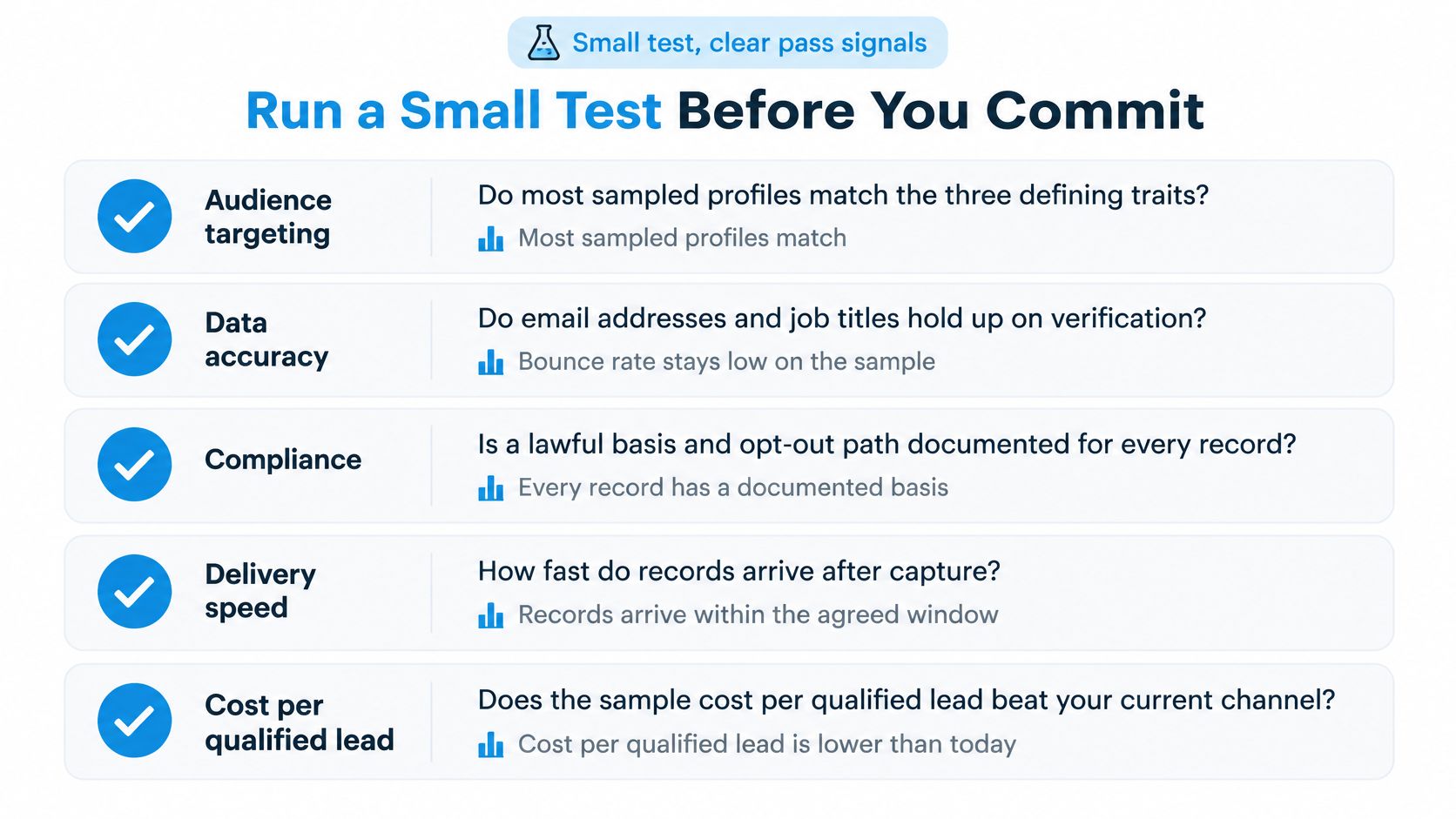
Every factor that determines whether a lead generation solution pays off fits on one five-row scorecard. Rather than trusting demo decks or sample exports hand-picked by a vendor, judge any provider against clear pass signals on your own target audience.
| Criterion | Question to Ask | Pass Signal |
|---|---|---|
| Audience targeting | Do most sampled profiles match the three defining attributes? | Most of the sample matches without manual rework |
| Data quality | How many records pass the six quality checks? | A strong majority of the sample passes all checks |
| Workflow speed | How long from capture to first touch? | First touch lands inside the team's response window |
| Governance | Are source, purpose and opt-outs recorded for every record? | Every record has source, timestamp and suppression status |
| Cost per usable contact | What does one usable contact cost after cleaning? | Cost stays within the budget the team set beforehand |
Keep this checklist beside your spreadsheet while running your pilot so every team member scores the test against the same yardstick.
Four Steps to Run an Honest Pilot
You can validate a new prospecting workflow in an afternoon without risking your monthly marketing budget:
- Select one focused audience source. Choose a single public account's followers, following list, hashtag, or engaged post commenters aligned tightly with your three defining attributes.
- Pull a 500-profile test sample and audit 50 rows. At HarvestMyData, we offer a free trial of up to 1,000 accounts on request from support with no payment required, returning real data so you can judge fit directly before buying. Every order also includes a live status page updating as profiles process (showing users fetched, emails found, and percent complete, plus optional push notifications), letting your team prep CRM routing before the CSV even arrives.
- Score the sample across all five criteria. Log your duplicate rate, verify a 50-record slice against your six quality gates, track the bounce rate on a small controlled test send, and confirm every row carries provenance metadata while keeping outreach compliant with laws like CAN-SPAM and GDPR and honoring every opt-out.
- Make the call on usable cost and match rate. Ignore the raw row count at the bottom of the spreadsheet. Look strictly at match rate, workflow speed, and cost per usable contact.
If your test clears all five rows of the scorecard, scale that audience source with confidence. If it falls short on match rate, accuracy, or usable cost, tighten your targeting or walk away before locking your team into a tool that creates more cleanup than pipeline.
Ready to run your own small-scale test with clean, structured Instagram exports and transparent pay-per-job pricing instead of a bloated monthly subscription? We extract publicly listed emails, phone numbers, bios, websites, and categories from targeted follower, following, hashtag, commenter, and liker audiences straight into ready-to-import CSV and Excel files with live progress tracking. Request a free sample or build your first targeted job directly at HarvestMyData.
We built HarvestMyData to handle all of this for you.
No proxies, no code, no account needed.