How to Find an Instagram Business Email That Actually Works

Around 10% of broad Instagram business-email jobs turn up usable candidate addresses, and niche or business-heavy audiences usually do better. That's the number I'd use before I touch a spreadsheet, because it keeps the process honest and stops you from mistaking volume for traction.
If you're staring at hundreds of Instagram handles and wondering why the inbox is still quiet, the problem usually isn't effort. It's that people treat Instagram business email like one field when it's really four different evidence levels, and each one needs a different extraction and validation path.
Table of Contents
- The Mistake That Sinks Most Instagram Email Outreach: Treating Four Evidence Levels as One
- What an Instagram Business Email Actually Is
- Start with the profile itself - Tap the Email button - Follow the linked website - Search the username elsewhere - Check public comments for self-promotion
- The Four Evidence Levels for a Public Business Email
- Manual Discovery vs Automated Extraction
- How to Validate What You Collected
- Run the list through a staged pipeline
The Mistake That Sinks Most Instagram Email Outreach: Treating Four Evidence Levels as One
I see the same pattern every week. A founder exports a pile of Instagram profiles, assumes every visible contact field is equally usable, sends one generic sequence, and then wonders why reply rates are thin or bounces are ugly.
The mistake starts with expectation. Broad jobs do not produce a clean, complete directory, they produce a partial one, and the ~10% email yield from public-profile extraction is the right mental model for planning, especially once you factor in validation and suppression. Yield can be better when the audience is concentrated in business or niche segments, but it is still not a number you can count on row for row.
The second mistake is collapsing every contact clue into one bucket. A bio email, a contact button, a linked website, and an inferred address are not the same thing, because each one comes from a different access condition and carries a different confidence level.
Practical rule: If you cannot say where the address came from, you do not know what you are sending to.
That matters because sales teams do not get paid for rows. They get paid when a qualified person replies, books, or buys. So the work breaks into four parts, define what is public, choose the right manual path, decide when automation is worth it, and validate hard enough that the final list is safe to mail.
What an Instagram Business Email Actually Is
Instagram business contact data exists because business profiles were built to connect discovery, measurement, and commercial activity in one place. Instagram's 2016 business-tool rollout included business profiles, analytics, and in-app ads, and that launch made contact details strategically valuable rather than incidental, especially once Instagram said 50% of people followed a business and 60% used the platform to learn about products and services at launch. See the original rollout announcement for that context, not as a scraping guide, but as the reason these fields exist in the first place, Instagram's business-tools launch coverage.
The term Instagram business email gets used loosely, but in practice I treat it as four separate evidence levels. The first is bio text, where someone types an email into the profile description. The second is the platform contact control, the Email button on business or creator accounts. The third is the linked site, where the profile points to a website that may publish a contact page. The fourth is inferred, where you build an address from a name and a domain, but the person never published that address on Instagram.
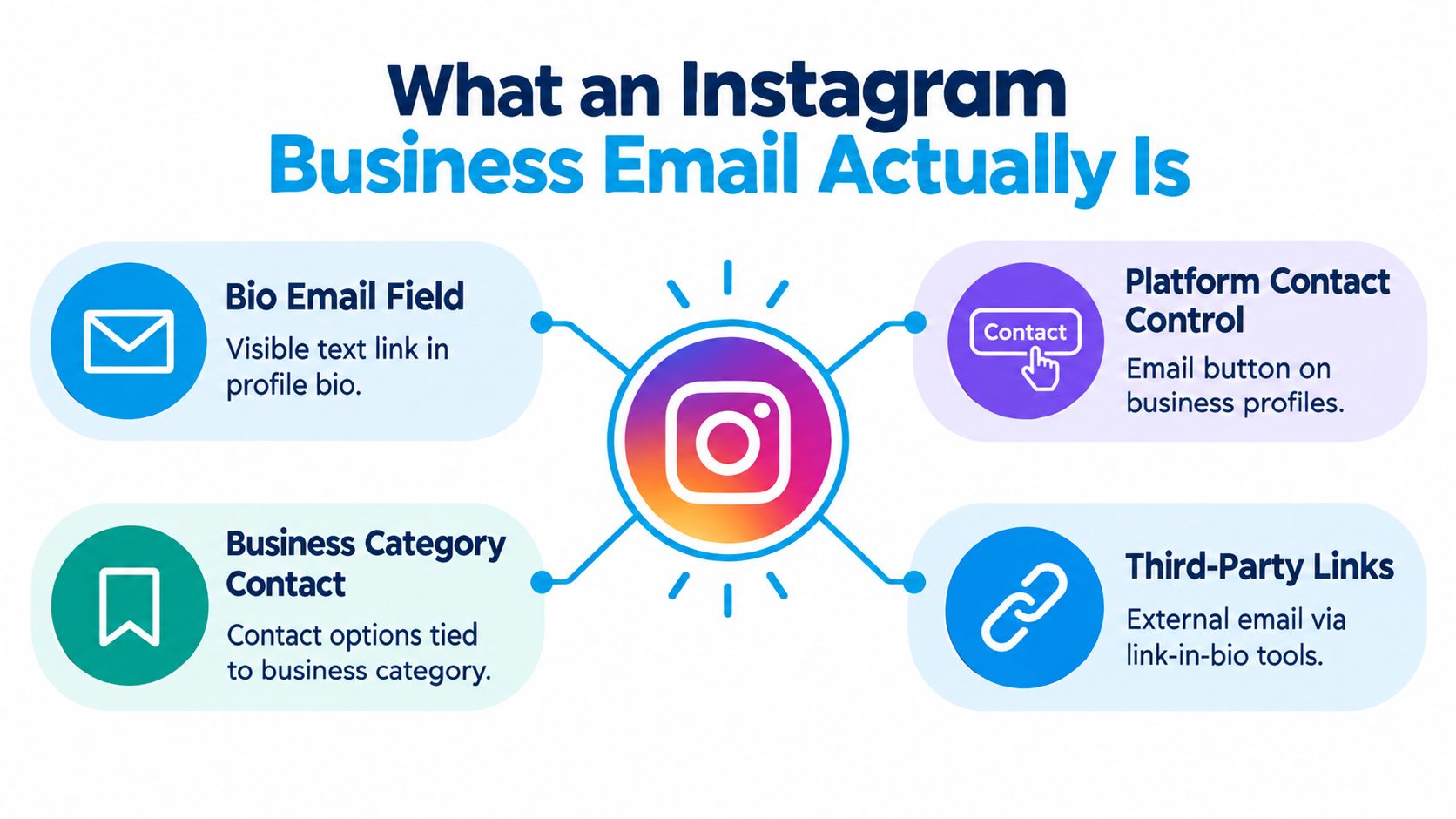
How I classify each level
- Bio text, high confidence. If it appears in plain profile copy, the account holder chose to show it.
- Platform contact control, high confidence. The button exists because the profile was configured for business contact.
- Linked site, medium confidence. The email may belong to the same company, but it's one step removed from Instagram itself.
- Inferred address, low confidence. Useful for research, not something I'd treat as published proof.
A lot of bad outreach starts when teams skip this distinction. A returned address is not automatically an invited address, and a visible business profile is not the same as permission to email.
Manual Ways to Find a Business Email on Instagram
When I need a few dozen names fast, manual work still has a place. I just don't pretend it scales cleanly, because the time cost rises sharply once you move beyond a few hundred profiles.
Start with the profile itself
The bio is the cheapest check. Scan for a plain email string, then confirm whether it looks like a company mailbox or a personal one. This is the quickest path when the owner wants incoming sales or press enquiries, but it's also the easiest place to over-read a handle or typo as a valid contact.
Tap the Email button
Business and creator profiles may expose a contact button instead of writing the address in the bio. That's a real public signal, but it's still only available on profiles that chose to enable it. I use it to confirm the profile is commercially active, then I capture the address if it's displayed.
Follow the linked website
Many profiles hide the contact on a site they control. A homepage footer, a contact page, or an About page often gives you a stronger business contact than the Instagram bio does. If the website routes to a form instead of an inbox, treat that as a meaningful signal too, because the company may prefer intake through forms rather than direct mail.
Search the username elsewhere
A username search across Google and company domains often surfaces the same brand with a published contact address on a different asset. That's especially useful when the Instagram profile is sparse but the company has a proper site presence.
Check public comments for self-promotion
Some owners drop their business email in comments, captions, or pinned replies when they're answering customer questions. It's public, but it's messy, so I only use it when I can verify that the account holder posted it.
For a walkthrough focused on local prospecting, the internal guide on how to find local business emails on Instagram is a useful companion. The limitation is obvious, though. Manual discovery works for targeted outreach, but it stops being a workflow once you're staring at bulk lists.
The Four Evidence Levels for a Public Business Email
The cleanest way to avoid bad records is to label what you've got before you validate it. That means separating evidence from assumption and using the weakest possible claim that still matches the source.
| Evidence Level | Source Field | Confidence | Recommended Use |
|---|---|---|---|
| Bio text | Email typed into profile bio | High | Cold outreach, partner follow-up, press or sales inquiry |
| Platform contact button | Email button on business or creator profile | High | Direct business contact, especially when the profile is clearly commercial |
| Linked domain contact page | Website linked from Instagram | Medium | Verify against the site before sending, then route to business development or support |
| Inferred address | Built from name plus known domain | Low | Research only, or validation against a separately published address |
The important divide is between what's published and what's inferred. A bio address and a contact button are public disclosures by the account holder. A linked site may be public too, but it moves one step away from Instagram, so I'd describe it as adjacent evidence, not direct Instagram evidence.
If the profile never displayed the address, say that plainly. Don't write as if Instagram exposed it when you inferred it elsewhere.
Validation also has limits. Syntax checks, domain checks, and deliverability checks can tell you whether a mailbox looks real and reachable. They can't tell you whether the owner expected your message, and they can't create consent where none existed.
Manual Discovery vs Automated Extraction
Manual work is fine when the list is small and the audience is specific. Once the job turns into repeated sourcing, automation usually wins on speed and consistency, but only if you accept that it still pulls from public data and still needs cleanup.
Manual discovery gives you control over each profile. You can judge context, spot odd categories, and see when a contact field looks out of place. The trade-off is obvious, it eats time, and the work breaks down fast when you're trying to process audience segments rather than a handful of accounts.
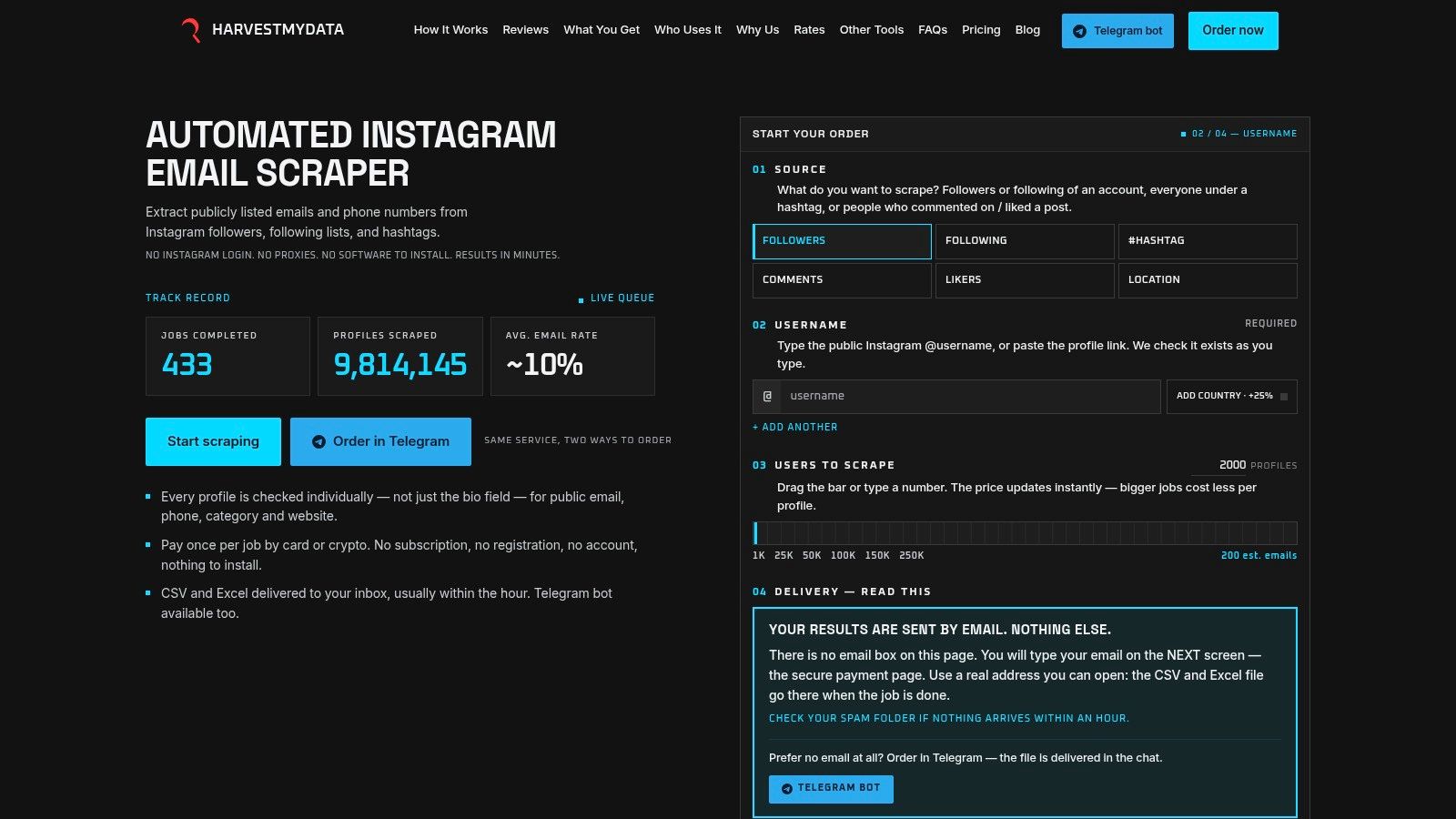
Automated extraction is better when the goal is repeatable prospecting. A pay-per-job service like HarvestMyData pulls public contact data from defined Instagram audiences without requiring your own login, and the ordering flow is built for jobs from 1,000 to 250,000 profiles with processing of about two minutes per 1,000 profiles and a $12 starting point for 10,000 enriched rows under its published pricing structure. For teams that care about throughput and consistent output, that changes the math quickly.
If you want a broader look at compliant collection practices, the guide on ethical email scraping methods is worth reading because the same discipline applies here, even though the source surface is different. The important trade-off is that automation doesn't make the data more public than it already was, it just makes the public data easier to process.
How to Validate What You Collected
The worst mistake isn't finding too few addresses. It's sending to too many bad ones and calling the result “lead gen” when the list was never clean enough to deserve that label.
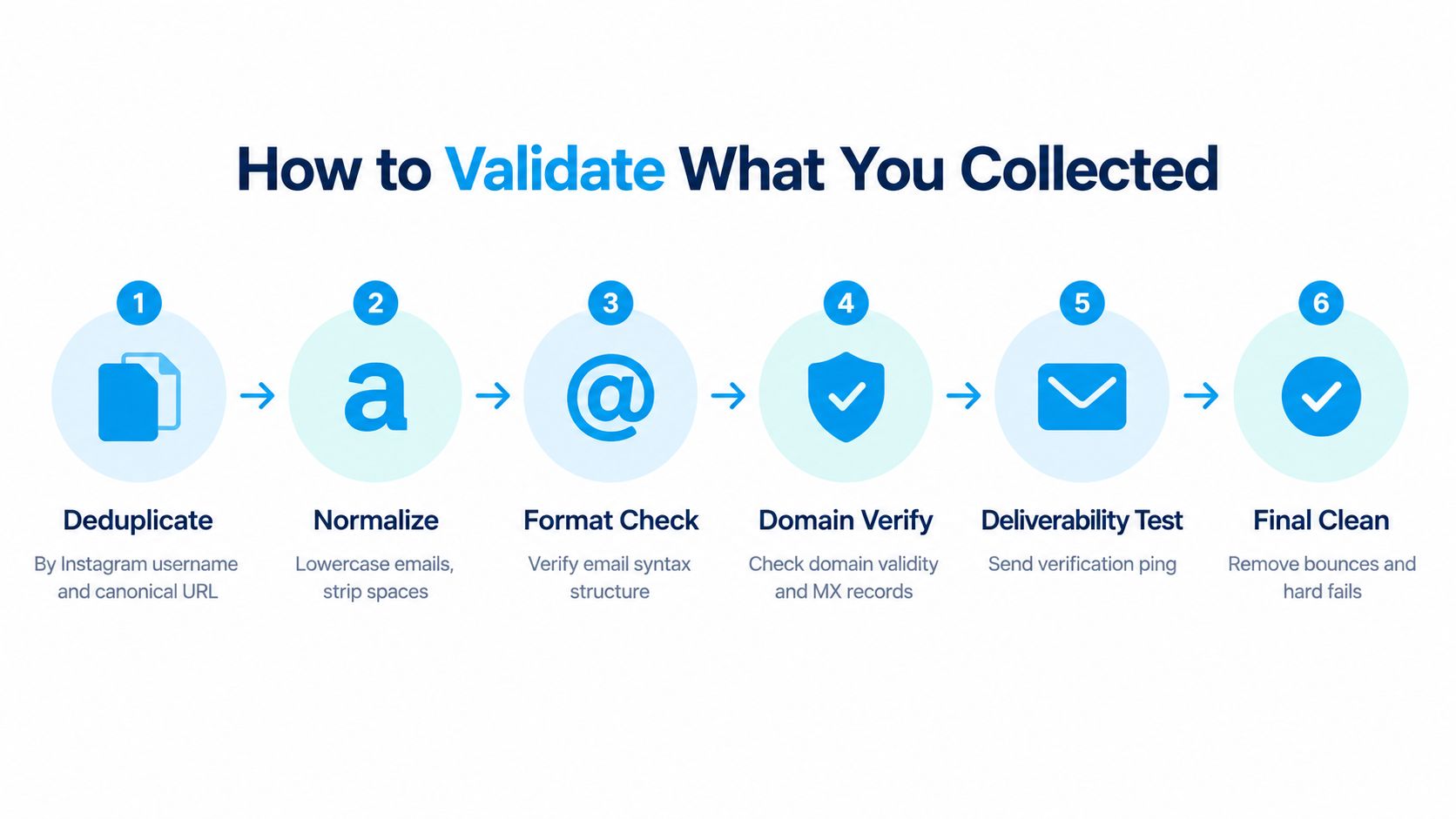
Run the list through a staged pipeline
- Deduplicate first. Strip duplicates by Instagram username and canonical profile URL so one person doesn't count twice.
- Normalize the address. Lowercase it, remove surrounding punctuation, and keep the original value for auditability.
- Check syntax. Make sure the mailbox format is valid before you spend time on the domain.
- Verify the domain. Confirm the domain exists and can accept mail.
- Classify mailbox type. Separate role-based mailboxes like info@, sales@, and contact@ from personal inboxes.
- Suppress risky records. Remove disposable, catch-all, bounced, and previously opted-out addresses.
The point of the pipeline is not to brag about the number of raw rows. It's to turn “candidate addresses” into a defensible send list. That's why I label every row with the source username, collection timestamp, profile URL, and evidence location before it goes anywhere near outreach.
If you want a practical checklist for the cleanup side, the internal guide on how to validate email addresses is the right companion piece. The rules are simple, but they matter because a public address still needs to survive delivery checks and suppression rules before it's safe to mail.
For teams that prefer tooling, an email deliverability checker is useful once the list is normalized, because it gives you another pass before the send. That doesn't solve consent, but it does keep obvious mailbox problems out of your sequence.
Lead Rate Is the Metric That Matters, Not Email Count
I care less about how many Instagram emails you collect and more about how many turn into usable conversations. A big export can look productive and still fail to produce pipeline. Lead rate shows whether the list did real work.
For planning, the large B2B prospecting analysis from OutboundIndex reported a 42% average open rate and a 3.71% lead rate, and it also found that open rate did not reliably track lead rate. Open rate can look strong while the list still underperforms, especially when privacy features inflate apparent opens. Treat it as a weak signal, not a target.
For a 10,000-profile job with the ~10% yield discussed earlier, you would expect about 1,000 candidate addresses before validation. If you then use the 3.71% lead rate as a planning reference after validation and audience fit, that works out to roughly 37 qualified leads as a directional scenario, not a guarantee. The gap between those numbers is where validation, segmentation, and message quality earn their keep.
What I watch before I send
- Audience source, because followers, following lists, hashtags, commenters, and likers behave differently.
- Country and category, because recipient rules and commercial relevance vary by market.
- Mailbox type, because a role account and a personal inbox should not receive the same sequence.
- Suppression status, because previous opt-outs and bounces should stay out of the pool.
- Observation window, because replies and qualified conversions matter more than immediate opens.
A clean test setup uses a randomized holdout by audience source, with country and category held constant where possible. I then track delivery, hard bounce, complaint, unsubscribe, reply, meeting, and qualified-lead outcomes instead of celebrating the open column.
For cost planning, the internal note on cost per lead calculation fits here, because this is the point where the list starts to behave like a revenue input instead of a data file. Publicly visible still does not mean consented, so send rules need to reflect UK fairness and transparency expectations, EU consent rules where applicable, and US CAN-SPAM obligations before launch.
If you need public Instagram contact data turned into something a sales team can use, HarvestMyData pulls public business and creator emails from defined Instagram audiences and delivers them in CSV or Excel format. It works well when you want discovery separated from validation and outreach, so you can start with a cleaner list instead of raw profiles.
We built HarvestMyData to handle all of this for you.
No proxies, no code, no account needed.