Business Contact List: How to Build One Responsibly

The usual advice for building a business contact list is to collect more emails, export a spreadsheet, and start sending. That skips the decisions that make the list useful: who belongs in it, where each detail came from, how you'll check it, and whether you can lawfully use it.
A larger file isn't necessarily a better sales asset. A smaller, well-documented list can give your team something more valuable than volume: a clear reason to contact each business and a reliable way to exclude anyone who shouldn't receive a message.
Table of Contents
- What separates a working list from a pile of names
- Business context can still identify a person - Keep the metadata beside the contact
- Make the decision operational - Collection policies don't replace your assessment
- Build the records in a deliberate order - Check the handoff before importing
- Measure usefulness, not just availability - Run a controlled pilot - Follow the records into the campaign
- Give each use its own qualifying fields
What a Business Contact List Is and Why It Matters
Think of a well-kept address book for work. Each entry tells you not just who someone is, but why you would call them.
A business contact list is an organized set of records describing companies and the people who work for them. It typically includes a company name, contact name, role, business email, phone number, and website so a team can reach an appropriate person for sales, marketing, partnerships, or research.
Say an agency sells booking-page improvements to independent fitness coaches. A name and email address don't tell its sales representative whether someone runs a coaching business, serves the right region, or already has a suitable website. Those details determine whether an introduction makes sense.
A useful record brings the contact and its context together.

What separates a working list from a pile of names
A contact list isn't automatically an opt-in mailing list. Someone who subscribed to your newsletter has a different relationship with your business from someone you discovered through a public profile.
Nor is a raw export ready just because every row has an email. Look for these components:
- Identity: The company and person, with an appropriate contact channel.
- Context: Their role, category, location, and connection to your target audience.
- Provenance: The source and collection information needed to check the record later.
Once records move between spreadsheets, email tools, and a CRM, consistent organization matters. PostSyncer's guide to organizing contact records across channels is a useful companion for planning that handoff.
Judge any list you're offered by whether your team can explain who belongs in it, why they're relevant, and how their details were obtained. Those questions also give you a practical starting point for building your own.
The Fields a Useful Contact List Needs
A spreadsheet whose only column is "email" is a pile of addresses, not an asset. What turns it into one is structure: the fields you agree on before the search begins, so a teammate who never ran that search can still open a row and trust it.
A schema works like a paper form. The boxes you print decide what gets recorded, and a poorly designed form leaves you with answers you cannot use later. Here is a schema that holds up:
Core fields in a business contact list
| Field | Category | Example | Used for |
|---|---|---|---|
| Company name | Business | Brightline Studio | Segmenting by organisation |
| Contact name | Personal | Jane Ortiz | Personalising the first message |
| Role or title | Business | Founder | Choosing the right decision-maker |
| Public business email | Business or personal | Shared company inbox | Direct outreach where lawful |
| Phone number | Business or personal | Published office line | Calls where lawful and published |
| Website | Business | Company homepage | Checking company fit |
| Category or niche | Business | Fitness coach | Segmenting by audience |
| Country | Inferred | United Kingdom | Routing by region |
| Source username or URL | Provenance | @brightlinestudio | Tracing and rechecking the record |
| Collection date | Provenance | 2025-11-03 | Judging how stale the record is |
| Suppression status | Compliance | Do not contact | Honouring opt-outs |
Read the table as an agreed structure for your records. The examples show what belongs in each column, not a promise that every field arrives for every contact. Missing values are normal. A column nobody can explain is the warning sign.
Company and category carry your segmentation. A contact's role decides which recipient you address. The source identifier is the audit trail: when a record looks wrong, a teammate can reopen the profile and check that one detail instead of repeating the original search.
Business context can still identify a person
Organizational fields describe a business, but their labels do not decide their legal status. A founder's name, professional email and profile together describe an identifiable person.
The EU General Data Protection Regulation defines personal data as information relating to an identified or identifiable living person, including names and online identifiers. A professional contact detail can therefore still be personal data. Ordinary fields combining into identification is the common case, not the exception.
Keep business-level context and person-level detail in separate columns. A sole trader's website or a mobile number printed on a business profile does not turn impersonal because of where it appeared.
Keep the metadata beside the contact
Add three more columns: intended use, verification status, and a marker for observed versus inferred values. A country guessed from profile clues should never be formatted the same way as a location the business states outright. That distinction separates a record you can defend from one you have to rebuild from nothing.
For a practical explanation of adding context without losing track of the original record, read our guide to contact data enrichment. Enrichment should answer a business question, not become an excuse to collect every attribute a profile happens to expose.
Schema rule: If nobody can explain why your team needs a field, leave it out.
A collection date, suppression status and intended use will outlast any decorative column nobody checks. Build the table once, keep the metadata your workflow can maintain, and the list stays a governed asset rather than a file someone exported in a hurry.
Check the Lawful Basis Before You Build
Visible isn't the same as permitted. A public profile can help you discover a business, but it doesn't settle whether a particular marketing use is lawful.
The UK Information Commissioner's Office guidance on B2B marketing explains that UK GDPR applies when business contacts' personal data is processed for direct marketing, requiring a lawful basis, transparency, and respect for the individual's absolute right to object; when details come from public sources, privacy information generally must be provided within a reasonable period and no later than one month after collection.
That means compliance decisions belong before extraction, not after the sales team has written its sequence. If you're buying a list, establish the seller's lawful basis for collection and sharing, then assess your own basis for the intended use.
Make the decision operational
Give a named owner responsibility for approving the audience and proposed activity. Have that person work through these checks:
- Purpose and lawful basis: Document the intended activity and why the proposed processing is justified. Don't assume every business contact qualifies for the same approach.
- Transparency: Prepare the appropriate privacy notice and delivery method. A notice hidden on your website may not adequately inform someone whose details you collected elsewhere.
- Channel and region: Check the applicable email, calling, and other marketing rules for the recipient and contact type.
- Suppression: Screen the audience against your internal do-not-contact records and make sure objections reach every sending system.
- Message controls: Identify the sender clearly, provide a straightforward opt-out, and assign someone to handle requests.
Our GDPR email marketing guide provides supporting context for that assessment. MailAdept's Cold Email Compliance resource can also help you organize a campaign review, alongside jurisdiction-specific advice.
Collection policies don't replace your assessment
Our collection process uses publicly available information from social media profiles and other public sources. We don't access private accounts or protected content.
Our users agree to lawful use, compliance with anti-spam laws including CAN-SPAM and GDPR, no harassment or stalking, no resale or redistribution of raw data, and honoring opt-outs. These are operating boundaries, not a guarantee that every proposed campaign is permitted.
Before launch: Approve the audience, channel, notice, and suppression process together. Approving the file alone isn't enough.
Deliverability deserves a separate review with whoever manages your sending platform. Check authentication, unsubscribe handling, and the platform's current requirements before increasing campaign volume.
How to Build a List From Public Sources
Start with a written target, not an extraction button. It's easier to reject unsuitable records when everyone agrees on what a suitable contact looks like.
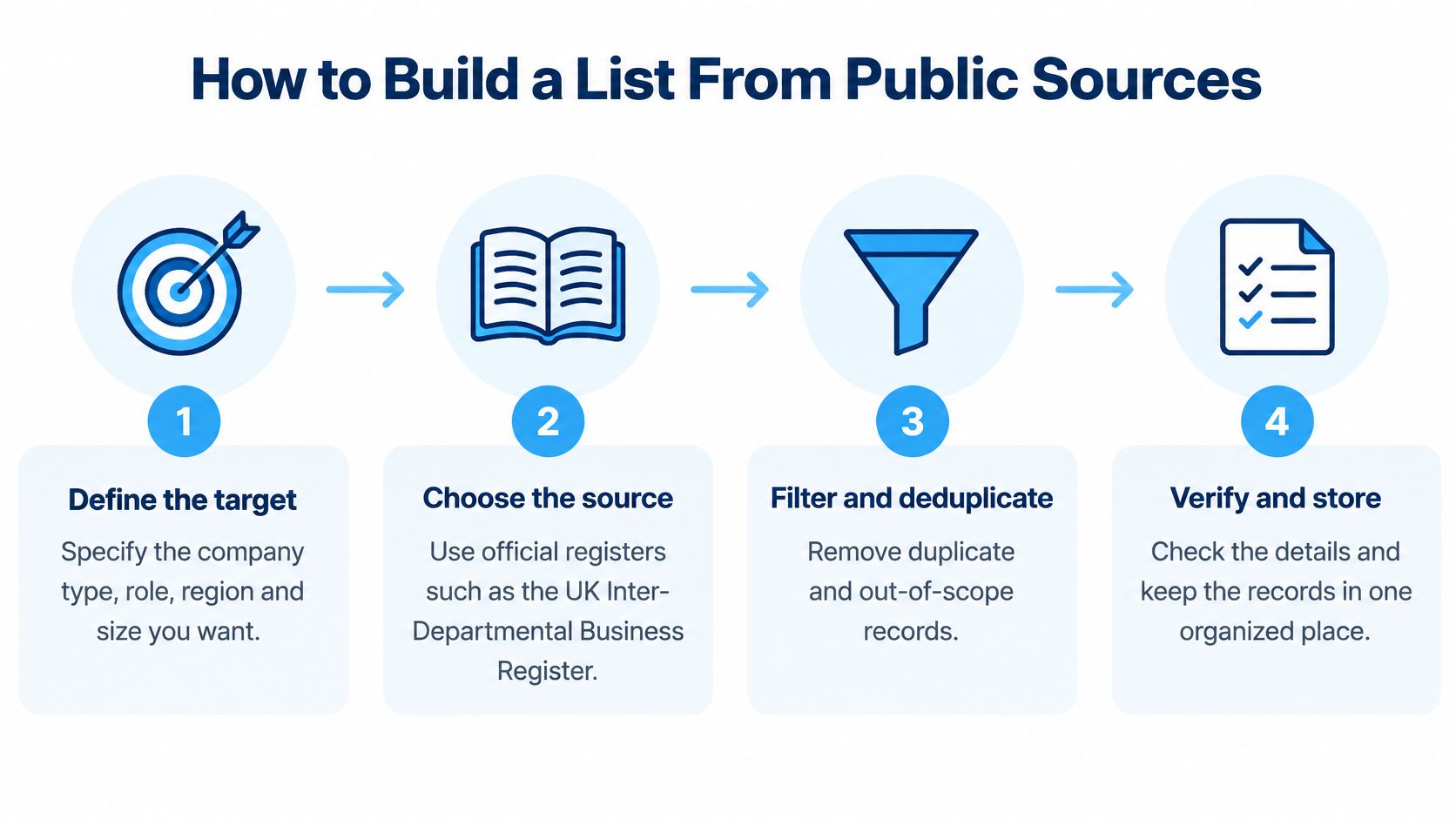
This process overview keeps discovery, filtering, and verification connected.
Build the records in a deliberate order
- Define the target. Write a sentence naming the company type, relevant role, region, and business size you want. For example, an agency might target independent UK fitness coaches who sell online programs, rather than everyone interested in exercise.
- Choose a source that fits the question. Use accessible official directories, trade directories, company websites, or defined public-platform audiences. The Office for National Statistics describes the UK Inter-Departmental Business Register as containing businesses registered for VAT and/or PAYE and serving as the sampling frame for government business surveys in 2025, but that description doesn't make it a downloadable prospecting directory.
- Assess the audience before collecting it. Business pages, creators, and coaches tend to publish emails more often than other account types. Inspect whether a following list contains relevant businesses rather than assuming a large follower audience consists of potential buyers.
- Collect only relevant public fields. Preserve the distinction between a published company contact and an address inferred from a naming pattern. In our collection process, each profile is checked individually beyond the biography field for public email, phone, category, and website.
- Enrich without disguising uncertainty. Add category and website where the source supports them, and label country as inferred when it isn't explicitly confirmed. Keep ambiguous records out of region-specific segments until someone resolves them.
- Attach the audit information immediately. Save the source identifier, collection date, intended use, and suppression status alongside each record. Skipping this during collection makes later investigation unnecessarily difficult.
- Clean and export the file. Keep a consistent row structure, remove obvious invalid entries, and prepare a UTF-8, comma-delimited CSV for Excel, Google Sheets, or your CRM importer. Check the import preview before committing it so phone numbers and international characters aren't altered.
For more detail on collection workflows, see our guide to web scraping leads. Keep the extraction method separate from the decision about which contacts qualify.
Check the handoff before importing
Use CRM segments for category and region, not separate unmanaged copies of the same spreadsheet. Keep suppression information in the shared workflow so a teammate can't accidentally reactivate an excluded contact through another import.
The video provides an additional view of the extraction workflow.
Before saving the finished audience, compare it with your original target sentence. If the records don't match, tighten the source or filtering criteria rather than trying to rescue the audience with generic messaging.
Measure, Test and Scale the List
A contact list is a governed data asset. Row count tells you how much you collected, not how much you can trust. Measurement starts with definitions your team can repeat, because a metric that changes meaning between exports is just a number with a label.
Quality checks for a contact list
| Metric | What It Measures | How to Set the Check |
|---|---|---|
| Email yield | Share of profiles with a public email | Use the 15-30% range typical of business niches such as fitness coaches or photographers as a starting expectation, then confirm it on a checked sample from your own source. |
| Correct address rate | Share of checked addresses that belong to the intended contact | Manually verify a random sample against the current public source and record the share that still matches. |
| Silent wrong rate | Wrong addresses that do not bounce | Sample delivered addresses that produced no reply and check identity manually. Set a tolerance your team will act on. |
| Field completeness | Share of rows with each field filled | Measure each field separately, because a usable email can coexist with a missing phone or category. |
| Duplicate rate | Rows matching another on normalized email plus platform ID | Run the same dedupe key on every export and set an acceptance limit before import. |
| Record age | Time since the collection date | Recheck high-value records before outreach and set a maximum age for each campaign. |
No universal pass mark fits every audience. Set thresholds from your own checked exports, then compare like with like: same source type, target definition, and validation method.
A deliverable email isn't necessarily the right email. It may reach a shared inbox, a former employee, or someone unrelated to your offer. Delivery and correctness need separate checks.
Measure usefulness, not just availability
NIST's data governance concept paper.pdf) identifies accuracy, bias, timeliness, completeness, relevance, and consistency as core data-quality dimensions. Translate those dimensions into checks your team can repeat rather than a vague label such as clean data.
Start with field-level coverage. A record containing a username but no usable contact channel shouldn't count as equally complete to one containing an appropriate, checked business email and relevant context.
Then inspect consistency. Canonicalize usernames, validate email syntax, and normalize international phone numbers to E.164 where you can establish the country code confidently. Don't invent a country code to make an incomplete number pass validation.
For deduplication, a composite key such as normalized email plus platform identifier gives you a reproducible starting point. Review shared inboxes separately, since different people can legitimately publish the same company address.
- Accuracy check: Does the detail still appear on the relevant source, and does it belong to the intended business or person?
- Relevance check: Does the record meet the segment definition, including role and location?
- Bias check: Does your source exclude relevant businesses that don't use that platform or publish contact details?
- Timeliness check: Has someone rechecked important records before committing substantial sales effort?
A fresh extraction proves when you collected a record. It doesn't prove that the published information was current.
Run a controlled pilot
Use a manageable pilot to uncover source problems before they become import problems.
- Choose a narrow segment. Select a clearly defined niche and region so reviewers can agree on what qualifies. Avoid combining unrelated audiences in the same test.
- Build a reviewable batch. Follow the same collection and cleaning workflow you intend to use at scale. A hand-polished pilot won't reveal weaknesses in an automated production process.
- Review a random sample manually. Open the source profiles and websites, classify the contact channel, and record errors by type. Include incomplete records, not just rows containing an email.
- Compare results with written acceptance criteria. Measure usable-contact rate, target-fit rate, duplicates, suppression matches, and missing metadata. Decide which failures require correction and which require excluding the source.
- Scale only after fixing repeatable failures. If reviewers repeatedly find unrelated accounts or uncertain locations, change the audience definition or filtering. More extraction won't repair a targeting problem.
Scaling is a process decision, not a volume decision. Keep the source, validation, and suppression rules fixed while the batch size grows, so a larger export amplifies a good source instead of hiding a bad one.
For previewing the export structure, our sample CSV download lets you inspect the available columns before planning an import. Treat that preview as a schema check, not proof of the quality of your particular audience.
Follow the records into the campaign
Data confidence is a wider operational issue: Cognism's coverage of an independent survey reports that only 25% of 500 U.S. operational leaders fully trusted their data. Your own checks should make trust explainable at the record and segment level.
After an approved pilot campaign, track positive replies, qualified accounts, complaints, and opt-outs alongside delivery failures. Record the denominator for each measure so your team doesn't confuse responses per delivered message with responses per collected profile.
If a segment produces irrelevant conversations despite technically valid contacts, revisit fit. If complaints or objections appear, pause and review the audience and use rather than treating them as ordinary cleanup.
Using the List for Sales and Marketing in Practice
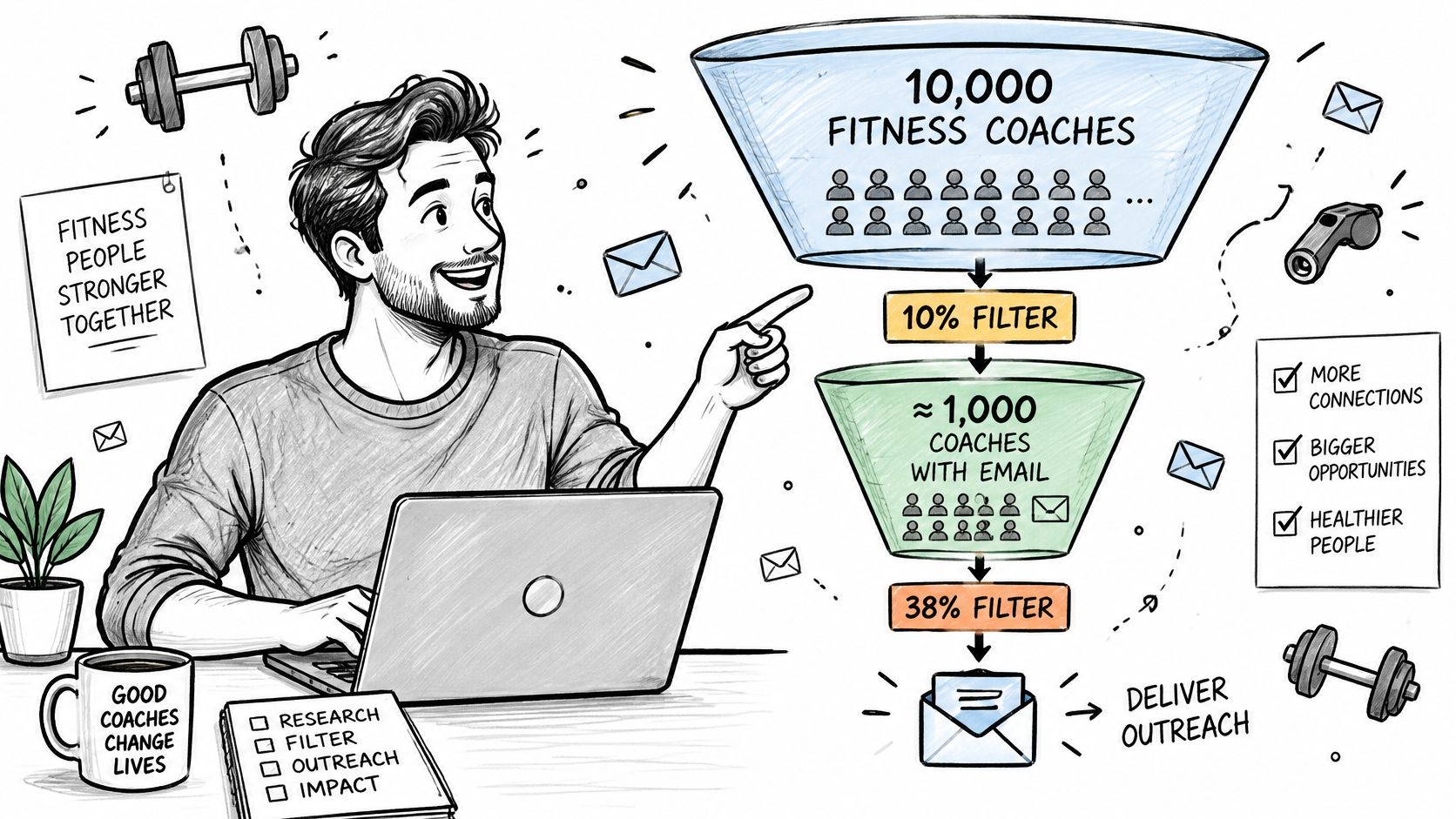
Say a small agency wants to offer booking-page improvements to fitness coaches. Its first export contains profiles connected to a relevant public audience, but the sales lead doesn't hand the whole file to an SDR.
Instead, she creates a working segment containing coaches whose business category and location match the offer. She excludes suppressed records, uncertain business identities, and contacts that don't meet the approved outreach criteria.
The funnel below represents those decisions, not a promise that every collected profile becomes a lead.
Give each use its own qualifying fields
The SDR checks a coach's website and notices that visitors must message manually to request a consultation. That business observation gives the rep a relevant opening about booking friction, without borrowing personal details from the coach's private life.
The marketing team doesn't automatically add the remaining contacts to a nurture sequence. It creates a separate segment with the appropriate permission or other applicable basis for that activity and records the intended use.
Field that matters most by use
| Use | Field That Matters Most | Why It Matters |
|---|---|---|
| Prospecting | Category and country | Only rows matching the offer and not suppressed are contacted |
| Partnership outreach | Role or title | Helps identify the person authorized to agree to a partnership |
| Event invitations | Suppression status and country | Honors opt-outs and routes invitations by region |
| Market research | Category and collection date | Compares segments using a recent, labeled sample |
A freelance consultant can apply the same discipline to a following list of businesses in a single niche. Following the same account provides discovery context, not evidence of an existing relationship or permission to market.
For phone-based prospecting, teams working with cold callers through hireSDR.com should hand over approved business numbers, relevant context, and suppression instructions together. A phone column without calling eligibility is an incomplete handoff.
Message rule: Use a specific business observation to explain relevance. Don't use personal information merely because you found it.
The strongest opening connects an identifiable business need with a useful offer. Keep the contact's context attached to the record so the next teammate can make that judgment too.
HarvestMyData extracts publicly listed contact information from defined Instagram audiences and delivers structured CSV and Excel files for sales, marketing, and research workflows. Visit HarvestMyData to preview the sample CSV, then plan your target segment, validation checks, and lawful-use controls before ordering a list.
We built HarvestMyData to handle all of this for you.
No proxies, no code, no account needed.